
TL;DR:
- Hospitality EPOS manages the entire service journey, unlike basic POS systems.
- Key features include table management, split bills, kitchen integration, and offline mode.
- Choosing the right system improves efficiency, reduces errors, and boosts profitability.
Many venue owners assume that any modern till or card reader will handle their operation just fine. That assumption costs time, money, and customers. A standard POS processes a transaction and stops there. Hospitality EPOS does something fundamentally different: it manages the entire service journey, from the moment a guest is seated to the second their bill is settled. For cafes, bars, and restaurants operating in a busy UK market, that gap between a basic till and a purpose-built hospitality system is enormous. This guide breaks down exactly what hospitality EPOS is, why it matters, and what you should be looking for before committing to any system.
Table of Contents
- What makes hospitality EPOS different from standard POS?
- Key features every hospitality EPOS should offer
- Matching EPOS systems to your venue’s service model
- Workflow efficiency, reliability, and staff training: What truly matters
- Why the right hospitality EPOS is an investment, not a cost
- Find your next step: Smarter hospitality EPOS for UK venues
- Frequently asked questions
Key Takeaways
| Point | Details |
|---|---|
| Hospitality-specific functions | Hospitality EPOS platforms handle service flows like table management, bill splitting, and kitchen integration. |
| System reliability matters | Uptime, offline capability, and rapid staff onboarding can make or break trading success in busy venues. |
| Match EPOS to service | Choose a system that fits your venue, whether table service, counter, or a blend. |
| A solution, not just a till | The right EPOS drives efficiency, better guest experience, and lasting profitability. |
What makes hospitality EPOS different from standard POS?
Now that you know why this distinction matters, let’s get clear on what sets hospitality EPOS apart from ordinary POS solutions.
A standard point of sale system is essentially a sophisticated cash register. It records sales, accepts payment, and prints a receipt. That is its world. Hospitality venues, however, operate in a far more complex environment where orders change mid-service, bills are split between groups, and kitchen staff need instant visibility of what has been ordered. A generic till cannot support any of that reliably.
Hospitality EPOS differs from generic POS through features like table management, split bills, and kitchen display integration. These are not optional extras. They are the infrastructure that keeps service flowing during a Friday night rush or a packed Sunday lunch sitting. Without them, your staff are compensating manually, which leads to errors, delays, and frustrated guests.
Understanding defining hospitality POS helps clarify why these systems exist as a distinct category. They are engineered around service workflows, not just transaction processing.
Here is a quick comparison to make this concrete:
| Feature | Standard POS | Hospitality EPOS |
|---|---|---|
| Payment processing | Yes | Yes |
| Table and floor management | No | Yes |
| Split billing | Limited | Full support |
| Kitchen display system (KDS) | No | Yes |
| Order modification mid-service | Rarely | Yes |
| Tab and tipping management | No | Yes |
| Offline resilience | Varies | Built-in |
“A hospitality EPOS is not just a smarter till. It is the connective tissue of your entire service operation, linking front-of-house, kitchen, and management in real time.”
The must-have features in any hospitality POS for restaurants include:
- Table and floor plan management: Lets staff visualise the full dining room, assign orders to specific tables, and track covers in real time.
- Split billing: Allows a table of eight to each pay separately without the frantic scribbling that causes mistakes.
- Order modification: Enables servers to update or correct an order after it has been sent, without starting from scratch.
- Kitchen display system connectivity: Sends orders directly to kitchen screens, removing paper tickets and verbal relay.
- Offline mode: Keeps you trading if your broadband drops, which matters enormously during peak service.
The hospitality POS importance becomes undeniable when you consider how much of your daily friction stems from systems that were never built for your environment.
Key features every hospitality EPOS should offer
With those unique needs defined, what specific features should you expect from a modern hospitality EPOS?
The feature set of your EPOS directly determines how smoothly your team can operate under pressure. A system that looks impressive on a demo but falls apart during Saturday service is worse than useless. Here is what genuinely matters, with context for each:
- Table and floor plan management assigns each order to a specific location, giving front-of-house staff a live view of covers, order progress, and table status.
- Split and group billing lets one table pay in any number of ways, by item, by person, or by custom split, without manual recalculation.
- Real-time order modification means a customer who changes their mind two minutes after ordering does not create chaos in the kitchen.
- Kitchen display and printer integration routes orders directly to the prep station that needs them, cutting ticket errors dramatically.
- Takeaway and delivery management keeps dine-in and off-site orders separated and correctly prioritised.
- User permissions controls who can apply discounts, process refunds, or access reports, reducing fraud risk and honest mistakes alike.
- Tab handling is essential for bars and pubs where customers run an open tab across multiple rounds.
- Tipping options lets guests add gratuity at the terminal, which increases tip rates and simplifies end-of-day reconciliation.
The EPOS features for restaurants most commonly missing from generic systems are precisely those that affect kitchen speed and bill accuracy.
A practical example: imagine a table of six at a casual restaurant. Two guests order starters, three go straight to mains, and one changes their order after the round is sent. With kitchen display system efficiency, the kitchen sees updated orders instantly, without a server running back to cross out a paper ticket.
Pro Tip: Before committing to any EPOS, test the split bill function with a complex scenario, say, a table of ten with mixed dietary requirements and separate payments. If the system struggles in a demo, it will fail in service.
When weighing up table vs counter service requirements, check whether the system handles both modes without needing separate hardware or subscriptions. Staff management in hospitality POS tools, such as role-based access and clock-in functions, add genuine operational control that generic tills simply do not offer.
Matching EPOS systems to your venue’s service model
With features in mind, it’s crucial to choose an EPOS system that complements the way your venue serves its guests.
Not every hospitality venue operates the same way, and your EPOS should reflect that. A full-service restaurant, a counter-service cafe, and a pub with table and bar ordering all have meaningfully different routing and workflow needs. Choosing EPOS for your service model is one of the most important decisions you will make when selecting a system.
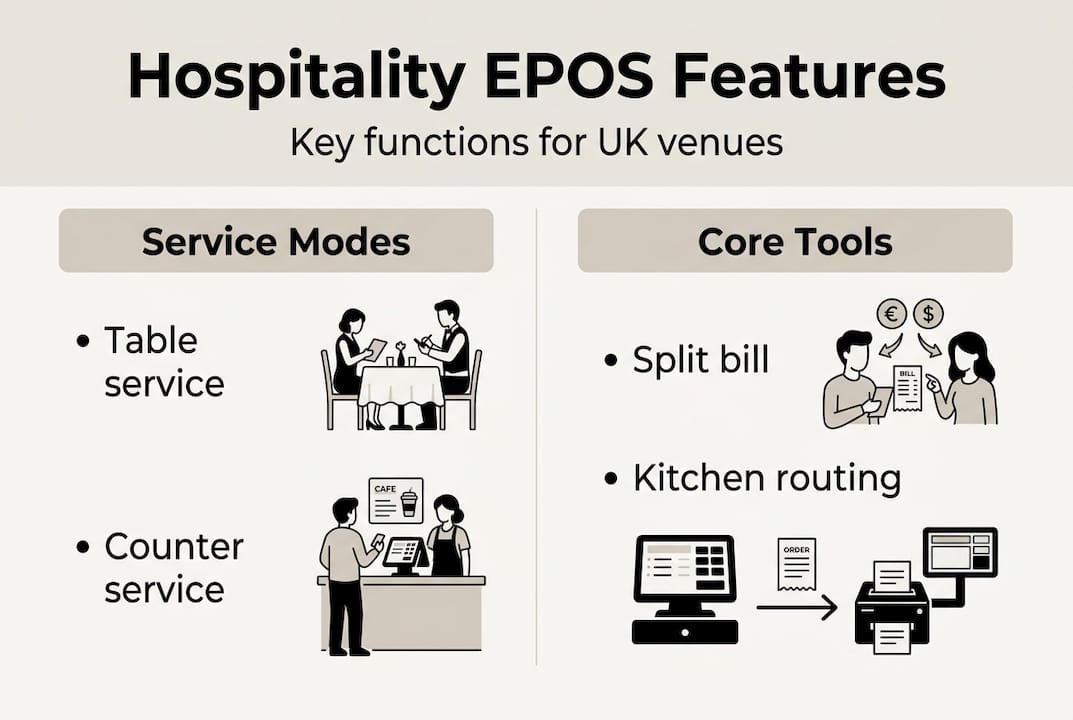
Here is how a well-configured hospitality EPOS supports each common UK service model:
- Table service (restaurants, gastropubs): Floor plan mapping, course-based order routing, server assignment per table, and bill management at the table or counter.
- Counter service (cafes, fast-casual): Queue-friendly order entry, fast payment flow, and optional customer display screens to reduce verbal errors.
- Hybrid service (pubs, casual dining): Tab automation that allows customers to order at the bar and also be served at a table, with orders routed correctly to the kitchen and bar.
- Mobile or catering: Tablet-based POS that works offline and syncs when reconnected, ideal for events, markets, or pop-ups.
Consider a busy city-centre pub. At lunchtime it runs counter service for quick sandwich orders. In the evening, it switches to table service for sit-down meals. A rigid system that only supports one model forces your staff to improvise the other, which is where mistakes and slow service appear.
A bustling cafe, by contrast, needs speed above all else. Every extra tap to complete an order adds seconds that compound across hundreds of transactions a day. The service model comparison between table and counter service reveals how different the operational demands really are.
Pro Tip: Ask any EPOS provider how their system handles a sudden shift in service style, such as moving from counter to table service during the same shift. If they cannot demonstrate it clearly, your future flexibility is already limited.
For kitchens managing multiple order types simultaneously, EPOS kitchen routing becomes the difference between a smooth service and one where orders pile up in the wrong station.
Workflow efficiency, reliability, and staff training: What truly matters
Beyond features and service compatibility, ease of daily use and reliability are what keep busy venues humming without friction.
A hospitality EPOS that is technically feature-rich but slow to operate or difficult to learn will drag your service down rather than lift it. Speed, accuracy, and ease of onboarding materially affect outcomes in hospitality EPOS adoption. In practical terms, a system that takes three taps instead of six to send an order to the kitchen is a measurable advantage across a full service.
Reliability is equally critical. Connection drops happen, and a venue that grinds to a halt because the broadband wobbled is one that loses revenue and guest trust. Look for offline resilience as a non-negotiable requirement, not a premium add-on.
Staff training is often underestimated. An intuitive interface means new team members can be confident on the floor within an hour rather than a full day. That saves you training time, reduces costly order mistakes during the learning curve, and keeps service quality consistent even when you are running with agency staff.
Here is a practical checklist when evaluating any hospitality EPOS:
- Request a live demo with realistic scenarios: a split bill, a mid-order change, and a busy multi-table period.
- Test the offline mode by disconnecting the internet during the demo to see exactly how the system behaves.
- Review the reporting interface to confirm management data is accessible and genuinely useful, not buried in exports.
- Check the onboarding process offered by the provider, including training materials and local support.
- Assess hardware compatibility so your existing screens, printers, or card readers can integrate without expensive replacement.
Pro Tip: Build a quick staff training checklist before going live. Include: logging in and out, sending an order, modifying a sent order, processing a split bill, and running the end-of-day report. If new staff can complete all five within their first hour, your system is well designed.
When considering upgrading your POS system, factor in not just the headline cost but the time saved per shift. Kitchen order screens alone can remove the lag between front-of-house and kitchen that causes most order errors in busy venues.
Why the right hospitality EPOS is an investment, not a cost
With the core facts in hand, let’s step back and consider a fresh perspective that many venue owners overlook.
There is a persistent mindset in hospitality that EPOS is just overhead, a necessary expense filed alongside the broadband bill and the card processing fees. That view is costing venues real money. The operators who thrive treat their EPOS as a foundation for how the business runs and grows, not a line item to minimise.
Think about what a well-configured system actually delivers: fewer voided transactions, fewer kitchen errors, faster table turns, and data that tells you which menu items to push and which to drop. Those are revenue outcomes, not just operational conveniences. A venue that turns tables fifteen minutes faster during peak service is not just more efficient, it is materially more profitable.
The sharpest venue managers we encounter review their EPOS as they would review their menu: regularly, critically, and with an eye on what is holding them back. POS systems and restaurant success are more connected than most owners realise until they experience the difference firsthand. If your current system is causing friction rather than removing it, that friction has a price tag you just are not seeing on an invoice.
Find your next step: Smarter hospitality EPOS for UK venues
Ready to take the next step in streamlining your operation?
Choosing the right hospitality EPOS does not need to be overwhelming, provided you know what to look for and have guidance from people who understand the UK hospitality environment. At eZeepos, we work with cafes, bars, and restaurants across the country to build systems that fit how they actually operate, not how a generic software template assumes they do.

Whether you are learning more about hospitality POS for the first time or ready to compare types of hospitality POS systems for your specific venue, we are here to help you make a confident, informed choice. Our local UK installation team and ongoing support mean you are never left navigating a new system alone. Get in touch and let us show you what the right EPOS can genuinely do for your venue.
Frequently asked questions
What does EPOS mean in hospitality?
EPOS stands for Electronic Point of Sale, and in hospitality it refers to systems designed specifically for restaurants, cafes, and bars to manage orders, tables, and payments in one platform. Unlike a standard till, hospitality EPOS supports unique workflows such as table management and split billing.
Can hospitality EPOS work without an internet connection?
Yes, many hospitality EPOS systems include an offline mode that allows you to continue taking orders and payments if your connection drops. Offline resilience is a key practical differentiator that separates purpose-built hospitality systems from basic alternatives.
How does a hospitality EPOS speed up service?
By routing orders to the kitchen instantly and giving staff an intuitive workflow for bill splits and order changes, a hospitality EPOS cuts wait times and reduces errors across the board. Kitchen display integration is central to faster, more accurate service in any busy venue.
Is it worth upgrading from a generic POS to hospitality EPOS?
If your venue needs table management, split billing, kitchen routing, or the flexibility to support different service styles, then upgrading is almost certainly the right move. Upgrading to hospitality EPOS unlocks core efficiency features that basic systems simply cannot replicate.
Recent Comments