
TL;DR:
- Digital ordering reduces wait times, errors, and increases table turnover in UK venues.
- Proper preparation includes reliable hardware, a structured menu, unique QR codes, and staff training.
- Hybrid models combining digital tools with human service deliver optimal efficiency and guest experience.
Slow table ordering costs UK hospitality venues more than just time. When guests wait too long to order, or when kitchen tickets arrive with errors, satisfaction drops and tables turn over more slowly, cutting directly into revenue. Mobile POS reduces order processing by 30%, kitchen screens cut errors by 35%, and table turnover improves by up to 25% when digital tools are properly implemented. This guide walks you through every practical step, from hardware selection to live troubleshooting, so your venue can deliver faster, more accurate service starting now.
Table of Contents
- Preparing for digital table ordering
- Step-by-step table ordering process
- Managing orders and real-time workflow
- Troubleshooting, special cases, and elevating results
- Why hybrid models and hands-on refinement win in UK hospitality
- Transform your venue with streamlined table ordering
- Frequently asked questions
Key Takeaways
| Point | Details |
|---|---|
| Preparation is key | Choose the right digital tools and set up integrated POS before rollout. |
| Follow a structured process | Implement your table ordering in defined steps for accuracy and reliability. |
| Go digital for speed and accuracy | Mobile POS and kitchen screens mean up to 30% faster orders and 35% fewer errors. |
| Educate staff and guests | Training and clear guides mean fewer issues and higher customer satisfaction. |
| Hybrid wins on experience | Digital systems work best when balanced with personalised staff service, especially in fine dining. |
Preparing for digital table ordering
Before a single QR code is printed or a tablet is mounted, you need to get the foundations right. Rushing into digital table ordering without proper preparation is one of the most common mistakes venue managers make, and it almost always leads to a painful, disruptive rollout.
Start with your hardware and software essentials. At minimum, you will need a reliable POS (point of sale) system, which is the central hub that receives, processes, and routes all orders. You will also need stable WiFi coverage across your entire dining area, not just near the bar. Dead zones mean orders fail silently, which is worse than no system at all. Tablets for staff, a QR code ordering platform, and kitchen display screens (KDS) round out the core setup.
Your digital menu is the customer-facing heart of the system. Every item must include accurate pricing, clear descriptions, and allergen information. UK law requires allergen declarations, so this is not optional. Build your menu in layers: categories, subcategories, modifiers (such as “no onions” or “extra sauce”), and upsell prompts. A well-structured digital menu reduces order queries and increases average spend.
Table mapping is often overlooked. Every table in your venue needs a unique identifier, both in the POS system and physically on the table via a QR code. If Table 7 and Table 17 share a code, orders will be misrouted. Most platforms generate unique QR codes per table automatically, but you must verify this before going live.
Cloud connectivity is not a luxury. Cloud-based POS systems are preferred for real-time analytics, remote menu updates, and failover resilience. If your system runs only on a local server and that server goes down during a Friday dinner rush, you have a serious problem. Cloud integration also means you can update prices or 86 a dish from your phone without touching a terminal.
Here is a quick overview of the core hardware you will need:
| Hardware | Purpose | Priority |
|---|---|---|
| Android POS terminal | Central order and payment hub | Essential |
| Staff tablets | Tableside order entry | High |
| Kitchen display screen | Real-time order routing | Essential |
| QR code stands/stickers | Customer self-ordering | High |
| WiFi access points | Network coverage | Essential |
Common pitfalls to avoid before launch:
- Skipping a test run with real staff before going live
- Ignoring staff input when choosing the platform
- Using generic QR codes not linked to specific tables
- Failing to test the system under peak load conditions
- Neglecting to train front-of-house and kitchen staff together
The importance of integrated POS cannot be overstated. Every component, from the QR menu to the kitchen screen, must talk to the same system.
Pro Tip: Run your first live test during a quiet Monday lunch rather than a Saturday night. Off-peak pilots expose technical snags without the pressure of a full house watching.
Step-by-step table ordering process
With your preparation complete, it is time to implement. Follow these steps in order and resist the urge to skip ahead.
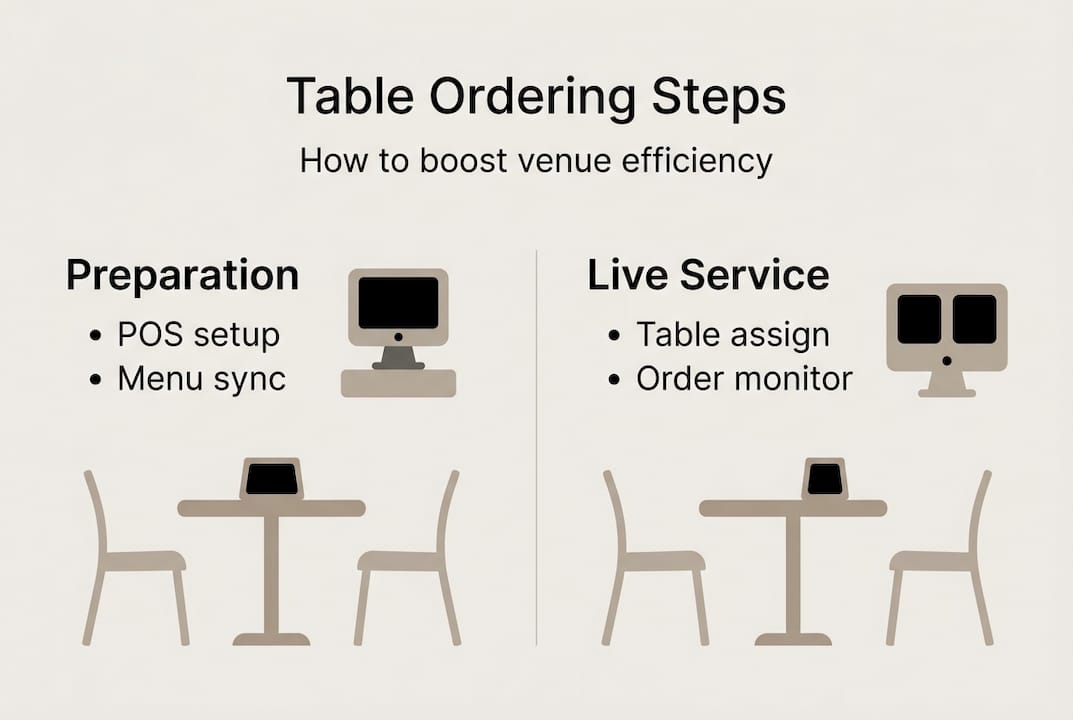
- Select your platform. Choose a QR ordering and POS platform that integrates natively. Bolt-on solutions that require manual syncing between systems create more problems than they solve.
- Build your digital menu. Input every item with descriptions, photos where possible, allergen flags, and modifiers. Test every item as a customer would before going live.
- Generate unique QR codes per table. Each code should link directly to that table’s ordering session in your POS. Label codes clearly during setup so installation is error-free.
- Place QR codes on tables. Use durable stands or laminated cards. Position them where they are immediately visible when a guest sits down, not tucked behind a condiment rack.
- Run a full system test. Place orders from every table, check they appear correctly on the kitchen screen, and process a test payment. Fix any routing errors before opening.
- Train your staff. Both front-of-house and kitchen teams need hands-on time with the system. Staff who understand the workflow catch errors faster and reassure uncertain guests.
- Add customer signage. A small card or table talker explaining how to order via QR removes friction for first-time users. Keep instructions to three steps maximum.
The QR code ordering workflow for UK venues works best when staff are briefed to assist guests who are less comfortable with smartphones, rather than leaving them to struggle.
Here is how QR self-ordering compares to staff tablet entry:
| Method | Speed | Error rate | Guest control | Staff involvement |
|---|---|---|---|---|
| QR self-order | Very fast | Low | High | Minimal |
| Staff tablet entry | Moderate | Low | Moderate | High |
| Paper pad | Slow | High | Low | Full |
For streamlining the ordering workflow, a hybrid approach often works well: QR for drinks and starters, staff tablet for mains and special requests.
Menu changes must sync instantly. If you remove a dish from the POS, it must disappear from the QR menu in real time. Stale menus generate complaints and refunds.
Pro Tip: Never share QR codes between tables. Even temporarily swapping codes during a busy service creates order confusion that takes far longer to untangle than the original problem.
Managing orders and real-time workflow
Once orders start flowing, the operational challenge shifts from setup to monitoring. A well-designed system largely runs itself, but your team still needs to know how to read it, respond to it, and keep it moving.
Table assignment is the first step in live service. Each table is activated in the POS when guests are seated, either by a host or automatically when a QR scan initiates a session. Orders placed by guests flow directly to the relevant kitchen screen, eliminating the verbal relay that causes so many errors in traditional service.
Your POS dashboard gives you a live view of every open table, including what has been ordered, what has been sent to the kitchen, and what is still outstanding. Use this to spot bottlenecks. If Table 4 has been waiting 22 minutes for a main course, the dashboard tells you before the guest has to flag down a member of staff.
Order splitting and merging are features every venue manager should know inside out. Guests frequently want to split a bill by item or by person, and a POS that handles this cleanly prevents awkward moments at the end of a meal. Modifiers, such as allergy flags or cooking preferences, should be attached to individual items so the kitchen sees them on every ticket.
Here is a summary of key real-time management tasks:
| Task | Tool | Frequency |
|---|---|---|
| Monitor open tables | POS dashboard | Continuous |
| Route orders to kitchen/bar | Kitchen display screen | Per order |
| Handle splits and merges | POS split-bill function | As needed |
| Update menu availability | Cloud back office | As needed |
| Review order error rate | Reporting dashboard | Daily |
Best practices for keeping orders smooth during service:
- Assign a dedicated floor manager to monitor the dashboard during peak hours
- Set up automatic alerts for orders that have not been acknowledged within a set time
- Use the table ordering benefits reporting tools to identify which tables or menu items generate the most queries
- Brief kitchen staff on modifier conventions so allergy flags are never ignored
- Keep a tablet at the host station for quick table resets between covers
Venues operating without live order visibility report significantly higher error rates and longer resolution times when service issues arise. Real-time dashboards are not a nice-to-have; they are the difference between a recoverable mistake and a lost customer.
The tableside ordering workflow covers splits, merges, and kitchen routing in detail, and is worth reviewing before your first busy service.
Troubleshooting, special cases, and elevating results
Even a well-prepared system will encounter problems. The venues that sustain efficiency gains are the ones that treat troubleshooting as an ongoing discipline, not a one-off fix.
The most common issues and their solutions:
- QR code mix-ups: If a guest scans the wrong table’s code, their order lands on the wrong ticket. Fix: check that every QR stand matches its table number before each service.
- Network dropouts: Orders fail or delay when WiFi is unstable. Fix: invest in commercial-grade access points and set up a 4G backup router for critical areas.
- POS disconnections: If the POS loses connection to the cloud, orders may not sync. Fix: choose a system with offline mode that queues orders and syncs when connectivity returns.
- Late menu changes: A dish sells out mid-service but remains on the QR menu. Fix: train a designated team member to update availability in real time via the cloud back office.
- Guest unfamiliarity with QR ordering: Some guests, particularly older diners, may struggle. Fix: staff should proactively offer to assist rather than waiting to be asked.
For bill splitting at peak times, prepare your team to handle requests quickly. Most POS platforms allow a bill to be split by seat, by item, or equally, and staff should be able to demonstrate this in under 30 seconds.
Special dietary needs deserve particular attention. Digital menus with allergen filters are a significant advantage here, but the kitchen must also receive clear, unmissable flags on every ticket. A missed allergen note is a legal and safety issue, not just a service failure.
Mobile POS and kitchen screens yield 30% faster processing and up to 25% more table turnover when the full system is working correctly. Real-world results back this up: QR pay-at-table saves 7 minutes per table at Daisy Green sites, equating to 84 hours saved per day across their estate. That is not a marginal gain; it is a structural improvement to profitability.
Bulleted best practices for continued improvement:
- Review order error logs weekly with your team
- Ask guests for feedback on the ordering experience, not just the food
- Monitor customer satisfaction gains through repeat visit data and review scores
- Update your digital menu seasonally and whenever pricing changes
- Celebrate wins with staff when error rates drop or turnover improves
Pro Tip: Create a shared log where staff can note any ordering issues during service. Review it every Monday morning. Patterns emerge quickly, and small fixes compound into significant improvements over weeks.
Why hybrid models and hands-on refinement win in UK hospitality
There is a temptation, especially after seeing the efficiency numbers, to go fully digital and reduce staff involvement as much as possible. We think that is the wrong instinct for most UK venues.
QR and self-serve ordering works brilliantly in casual dining, pubs, and fast-casual settings. QR ordering is prioritised for casual dining and pubs over fine dining, where personal service remains the core of the guest experience. A tasting menu restaurant that replaces its sommelier with a QR code has misunderstood what its guests are paying for.
The venues that get the best results are those that use digital tools to free their staff from repetitive tasks, not to replace human interaction entirely. When a server is no longer running between tables taking drink orders, they have time to check in, upsell thoughtfully, and handle the moments that genuinely need a human touch.
Refinement matters more than perfection at launch. Run pilots, gather feedback from both staff and guests, and adjust. A pub that tweaks its QR menu layout based on three weeks of customer behaviour will outperform one that launched a polished system and never revisited it. Fine dining POS options differ meaningfully from casual venue setups, and choosing the right configuration for your service style is as important as the technology itself.
Digital tools should empower hospitality, not flatten it.
Transform your venue with streamlined table ordering
Putting these steps into practice is straightforward when you have the right technology behind you. EzeePOS offers an Android-based platform built specifically for UK hospitality venues, covering everything from QR table ordering and kitchen screens to cloud reporting and staff management in one unified system.

Whether you run a busy pub, a fast-casual restaurant, or a multi-site operation, the platform scales to your needs without tiered pricing or hidden feature locks. If you are weighing up your options, explore the POS for quick service chains comparison or browse the full range of hospitality POS solutions to find the right fit. Local UK installation and ongoing human support mean you are never left troubleshooting alone.
Frequently asked questions
What do I need to start with table ordering in my venue?
You need an integrated POS, reliable WiFi, a digital menu with allergens listed, unique QR codes per table, and thorough staff training before going live.
How much faster can digital table ordering make service?
Venues typically see up to 30% faster processing and 25% quicker table turnover when mobile POS and kitchen screens are properly integrated.
How do I handle bill splitting and special requests?
Most POS systems allow splits and merges in-system and support digital modifiers so allergy and customisation flags appear directly on kitchen tickets.
Is table ordering suitable for fine dining?
Hybrid models work best; QR ordering suits casual venues and pubs, while fine dining benefits from staff-led service supported by digital back-end tools rather than full self-serve.
Recent Comments