
What is scalable POS? A guide for hospitality
TL;DR:
- A scalable POS system is a cloud-native platform that supports business growth by managing increasing transactions, users, and locations without performance issues. It features open APIs, offline functionality, and hardware flexibility, enabling seamless multi-site control and integration. Businesses should upgrade before expansion to avoid costly migration and architectural debt, ensuring operational efficiency and flexibility.
If you run a café, bar, or restaurant and your point of sale system struggles every time you get busy, add a new location, or try to connect it with your delivery platform, you are not dealing with a growth problem. You are dealing with a technology problem. Understanding what is scalable POS is the first step to fixing it. A scalable point of sale system is built to grow with your business, handling more transactions, more users, and more sites without slowing down or breaking apart at the seams.
Table of Contents
- Key takeaways
- What is scalable POS: architecture and core features
- Why scalability matters in POS for hospitality
- Common misconceptions about scalable POS
- My honest take on scalable POS
- How Ezeepos supports your growth
- FAQ
Key takeaways
| Point | Details |
|---|---|
| Scalable POS handles growth | A scalable system manages more transactions, locations, and users without losing performance. |
| Cloud architecture is the foundation | Cloud-native design with microservices and open APIs separates truly scalable systems from legacy ones. |
| Offline mode is non-negotiable | Reliable offline capability keeps your venue trading during connectivity issues and syncs data automatically. |
| Centralised control saves time | Menu updates, pricing changes, and reporting should propagate across all sites automatically, not manually. |
| Early adoption prevents costly migration | Switching to a scalable POS before you expand avoids architectural debt and expensive system overhauls. |
What is scalable POS: architecture and core features
A scalable POS system is a cloud-native platform capable of handling increasing transaction volumes, user loads, and data complexity across multiple locations without compromising performance, availability, or security. That definition matters because it rules out a lot of systems that call themselves scalable but are not.
Traditional POS systems were built for a single terminal in a single venue. Adding a second site meant buying more hardware, installing separate software, and manually synchronising data between locations. That is not scalability. That is duplication.
Genuinely scalable POS solutions are built on a different architectural model. Here is what distinguishes them:
- Cloud-native design. The system lives in the cloud, not on a local server. This means updates, backups, and performance improvements happen centrally without requiring on-site visits.
- Horizontal scaling. Microservices and containerisation allow individual components of the system to scale independently. Your payment processing can handle a Saturday night rush without affecting your reporting module.
- Multi-tenant architecture. Multiple venues share the same infrastructure without sharing each other’s data, keeping costs down and performance consistent.
- Open APIs. An API-first architecture lets your POS talk to delivery platforms, loyalty programmes, accounting tools, and payroll systems without custom development work.
- Hardware-agnostic software. The system runs on iPads, Android tablets, Windows machines, and kiosks. You are not locked into buying expensive proprietary hardware every time you open a new site.
- Offline mode with intelligent sync. Offline functionality keeps your venue trading during internet outages, with conflict resolution mechanisms that preserve data integrity when connectivity is restored.
Pro Tip: When evaluating any POS vendor, ask specifically whether their offline mode supports full transaction processing or only limited functions. Many systems claim offline capability but restrict it to basic sales only, leaving you unable to apply discounts, split bills, or access table plans during an outage.
Scalable POS architecture also relies on distributed database design, often using NoSQL databases, to handle high transactional loads consistently across geographies. For a group of venues spread across a city or a region, this matters enormously during peak service periods.
Why scalability matters in POS for hospitality
The operational benefits of a scalable point of sale go well beyond just handling more covers on a busy Friday night. They reshape how you manage your entire business.
-
Multi-location control from one place. Centralised menu management means you can update a price, add a seasonal dish, or change a promotion across every site simultaneously. No logging into each terminal separately. No risk of one location running last month’s pricing.
-
Faster service and fewer errors. When your POS integrates directly with your kitchen display screens and payment terminals, orders move faster and manual re-entry disappears. Staff spend less time correcting mistakes and more time serving customers.
-
Integration with the tools you already use. Open APIs prevent vendor lock-in and enable adding or swapping tools as your business needs change. Whether you add a new delivery partner, switch accounting software, or launch a loyalty scheme, a scalable POS adapts without a full system replacement.
-
Unified reporting across all outlets. Instead of exporting spreadsheets from three different systems and reconciling them manually, you see all your sales, labour, and inventory data in one dashboard. That gives you the information to make decisions quickly rather than spending Sunday mornings on admin.
-
Lower hardware costs over time. Hardware-agnostic POS platforms let you run the system on affordable Android tablets or existing devices rather than purchasing proprietary terminals at a premium every time you expand.
Pro Tip: Before committing to any scalable POS solution, map out every third-party tool your business currently uses, from your accountancy software to your online booking system. Ask the vendor to demonstrate live integrations with each one, not just confirm they exist on a features list.
Cloud POS adoption has grown by over 300% since 2020, driven by hospitality businesses recognising that legacy hardware simply cannot support the flexibility modern operations demand. The shift is not a trend. It is a structural change in how the industry manages technology.
Common misconceptions about scalable POS
This is where many business owners get caught out. The most dangerous misconception is confusing multi-location support with true scalability. A system that lets you add a second site but requires you to manually push menu updates to each terminal is not scalable. True scalability requires centralised configuration where changes propagate automatically across all sites the moment you make them.
There are several other pitfalls worth knowing before you sign a contract:
- Proprietary hardware lock-in. Some vendors sell affordable software but require you to use their specific terminals, printers, and card readers. When those devices become obsolete or the vendor raises hardware prices, you have no alternative. You are trapped.
- Architectural debt. Delaying migration from a legacy POS system accumulates what experts call architectural debt. The longer you wait, the more complex and expensive the eventual switch becomes, especially if your data is locked in a proprietary format.
- Offline capability that is not really offline. Some cloud POS systems require a constant connection to function. Others offer genuine offline mode with full transaction support and automatic sync. The difference becomes critical the first time your broadband drops during a Saturday service.
- Marketing language without technical substance. Vendors use words like “scalable” and “cloud-based” freely. Ask for specifics: What database architecture do they use? Do they support RESTful or GraphQL APIs? How do they handle conflict resolution during offline sync? If the sales team cannot answer these questions, the architecture probably cannot either.
The practical test for true scalability is straightforward. Ask the vendor: if I open five new sites next month, what do I need to do to get them live? The answer should be close to “add them in your admin panel.” If it involves site visits, hardware shipments, and manual configuration for each location, you are looking at a system with scalability in name only.
Practical applications in hospitality venues
Understanding the theory is one thing. Seeing how scalable POS works in a real hospitality context is what makes the decision clear.
Consider a group of three casual dining restaurants. The owner wants to run a lunch promotion on Tuesdays across all sites, but only between 12pm and 3pm. With a scalable POS, this is a time-based menu override set once in the back office. It activates and deactivates automatically. Without scalability, it means calling each site manager, hoping they remember to activate it, and chasing them when they forget.

Role-based access control is another practical advantage. A head chef at one site should be able to update the specials board for their kitchen but not change pricing across the group. A regional manager needs full reporting access but not the ability to alter staff permissions. A scalable POS handles this granularly, giving you control without creating administrative bottlenecks.
Here is a comparison of how traditional and scalable POS handle common hospitality scenarios:
| Scenario | Traditional POS | Scalable POS |
|---|---|---|
| Menu update across 3 sites | Manual update at each terminal | Single change in back office, instant propagation |
| Opening a new location | New hardware, fresh install, manual data entry | Add site in admin panel, inherit existing config |
| Integration with delivery platform | Custom development or manual order entry | API connection, orders flow directly to kitchen |
| Offline trading during outage | System stops or partial function only | Full trading continues, syncs when reconnected |
| Reporting across all venues | Export and reconcile spreadsheets manually | Unified dashboard, real-time data |
Comparing POS architectures
Not all cloud POS systems are built equally. The table below outlines the key architectural differences that affect scalability in practice:
| Feature | Cloud-native POS | On-premise POS |
|---|---|---|
| Scaling new locations | Add via admin panel | Requires on-site installation |
| Software updates | Automatic, centrally deployed | Manual, per-terminal updates |
| Hardware flexibility | Runs on any compatible device | Often tied to specific hardware |
| Offline functionality | Varies; best systems offer full offline mode | Local server may support offline but limits reporting |
| API openness | Open RESTful or GraphQL APIs standard | Often closed or limited integration options |
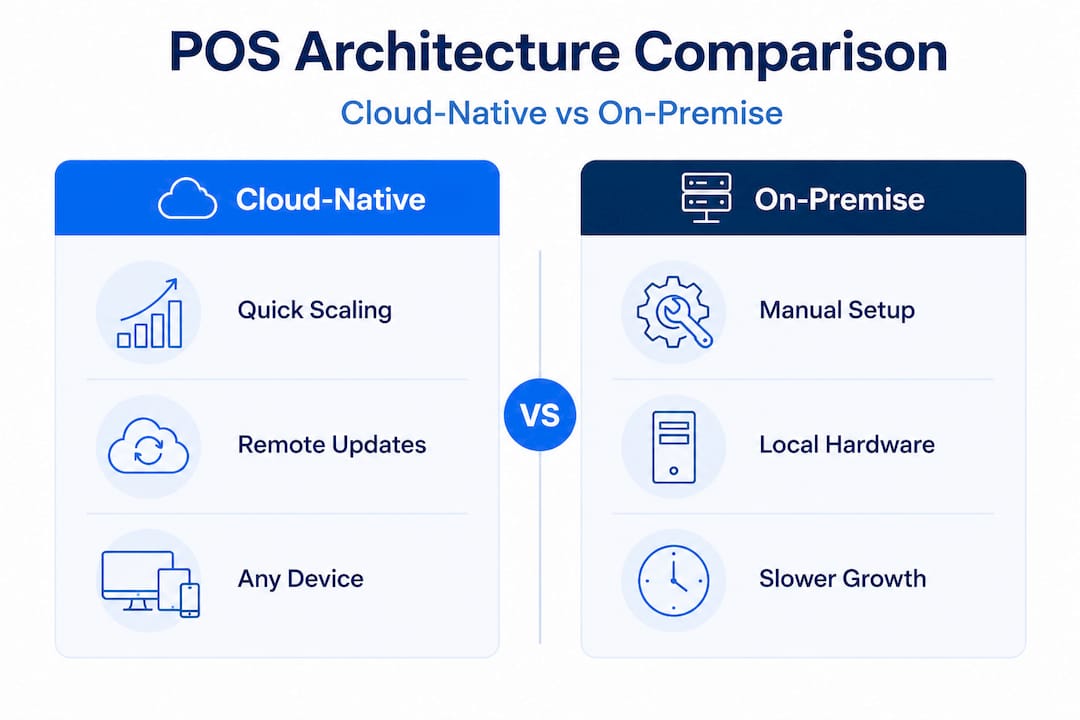
The hospitality technology trends shaping 2026 point firmly toward cloud-native, hardware-agnostic systems as the standard for any venue planning to grow. On-premise systems are not disappearing overnight, but their limitations become more apparent every time a business tries to add a site, integrate a new tool, or simply update a menu without calling their IT provider.
My honest take on scalable POS
I have seen too many hospitality businesses hold off on switching to a scalable POS because their current system “still works.” That logic is expensive. What they mean is that it still processes payments. What it is not doing is supporting growth, saving management time, or giving them the data they need to run a tighter operation.
The businesses I have watched struggle most are the ones that waited until they had three or four sites before addressing their POS architecture. By that point, the migration is painful. Data is fragmented across systems, staff are trained on different interfaces, and the cost of switching is multiplied by every location.
What I have learned is that the right time to move to a scalable POS is before you need it. When you are running one venue well and thinking about a second, that is the moment to get your technology right. The cost of doing it then is a fraction of doing it later.
The two things I see most consistently underestimated are offline mode and open APIs. Offline capability sounds like a nice-to-have until your broadband goes down at 7pm on a Saturday. Open APIs sound like a technical detail until you want to add a loyalty programme and discover your POS cannot connect to anything without expensive custom work. These are not edge cases. They are operational realities for any growing hospitality business.
My advice: treat your POS architecture the same way you treat your kitchen layout. Get it right before you scale, because retrofitting it later costs far more than doing it properly the first time.
— John
How Ezeepos supports your growth
If you are weighing up scalable POS solutions for your hospitality venue, Ezeepos is built specifically for the UK market with the architecture this article describes. The platform runs on Android hardware across countertops, tablets, kiosks, and kitchen screens, with a cloud-based back office that gives you centralised control over menus, pricing, promotions, and reporting across every site you operate.

There are no tiered pricing structures that lock key features behind higher plans. Every venue gets full functionality from day one, with local UK installation and ongoing human support from accredited providers. Whether you run a single café or a growing group of restaurants, Ezeepos is designed to support hospitality expansion without the architectural compromises that hold other systems back. Explore how Ezeepos works for your venue and see what a genuinely scalable POS looks like in practice.
FAQ
What is a scalable POS system?
A scalable POS system is a cloud-native point of sale platform that handles growing transaction volumes, additional users, and multiple locations without losing performance. It uses microservices architecture, open APIs, and centralised management to support business growth.
Why does scalability matter in a POS system?
Scalability matters because it allows you to expand your business, whether adding sites or integrating new tools, without replacing your entire system. Cloud POS reduces downtime by 80% in UK hospitality venues, directly protecting revenue during peak periods.
What is the difference between multi-location support and true scalability?
Multi-location support means the system can operate across several sites. True scalability means changes made centrally propagate automatically to all sites instantly, without manual intervention at each location.
How does offline mode work in a scalable POS?
A genuinely scalable POS continues processing full transactions during internet outages and automatically synchronises data once connectivity is restored, using conflict resolution logic to preserve data integrity.
When should a hospitality business switch to a scalable POS?
The best time to upgrade your POS system is before you expand to a second location. Switching early avoids architectural debt and the significantly higher cost of migrating fragmented data from multiple legacy systems later.
Recent Comments