
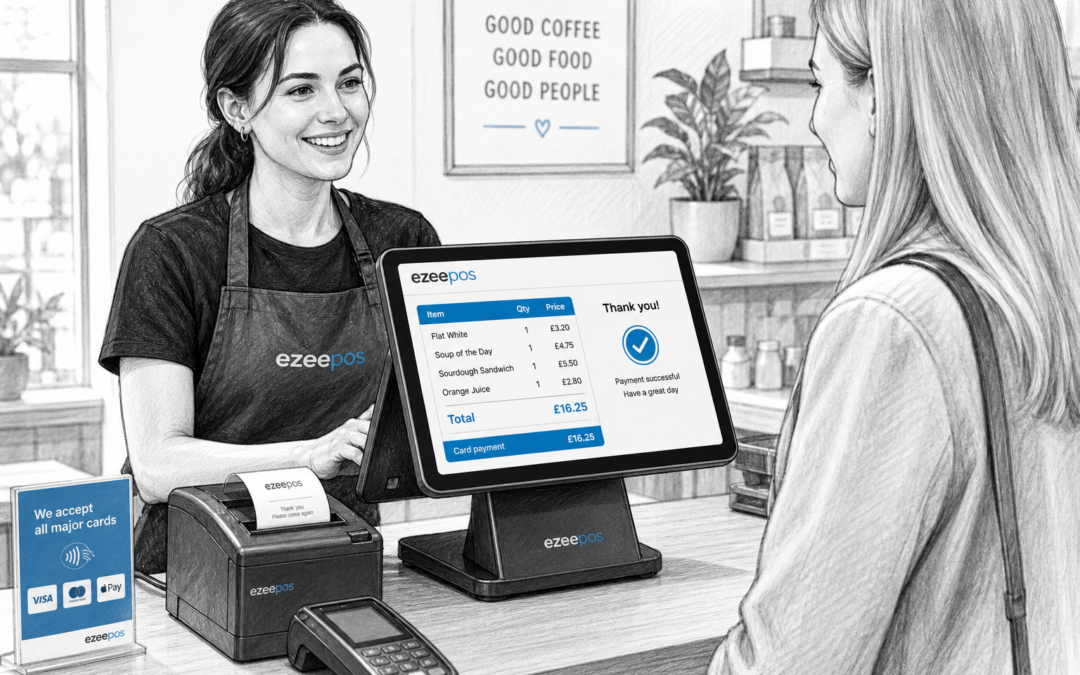
For many UK shops, cafes, bars and takeaways, the checkout is where speed and clarity matter most. If customers cannot easily see what has been added to the bill, the till can quickly become a source of confusion. That is where customer-facing displays can make a real difference.
At eZeePOS, a practical EPOS setup is about more than processing sales. It should help staff and customers stay on the same page during every transaction. A customer-facing display gives the buyer a clear view of the sale as it happens, which can help reduce misunderstandings, improve confidence and keep service moving.
What a customer-facing display does
A customer-facing display shows the customer key transaction details while the staff member is ringing through the sale. Depending on the setup, this may include item names, prices, totals, discounts, payment prompts and confirmation messages. In simple terms, it turns the checkout into a shared screen rather than a one-sided process.
That matters in busy environments. When customers can see what is being charged, they are less likely to ask for a second check at the end of the transaction. It can also make the service feel more open, especially when the counter is busy and staff are trying to serve quickly.
Why clarity matters at the till
Fewer last-minute questions
One of the biggest benefits of a customer-facing display is reducing those awkward moments when a customer waits until the end of the sale to ask what is on the bill. In retail, that might be a duplicate item, a promotion, or an accessory added by mistake. In hospitality, it might be a modifier, a drink, a side or an extra charge.
When the customer can see the order building in real time, they can query something early rather than after payment has been taken. That keeps the till moving and helps staff correct issues before they become delays.
Better trust at busy counters
Busy counters can feel rushed. In that setting, transparency helps build trust. A clear display reassures customers that the transaction is being handled properly, whether they are buying a basket of groceries, ordering lunch, or paying for a round of drinks.
For independent businesses, that confidence is valuable. It supports a smoother customer experience without needing a more complicated till process.
Practical uses in retail
In retail, customer-facing displays are especially useful at the point where price, quantity and discounts need to be obvious. They can help with:
- showing items as they are scanned
- confirming sale prices and offers
- highlighting discounts correctly
- making returns or adjustments easier to explain
- reducing accidental misunderstandings over the final total
This can be useful in convenience stores, gift shops, clothing shops and other independent retail settings where staff may be serving under pressure and customers want quick, clear service.
Practical uses in hospitality
In hospitality, clarity can matter even more because orders may include changes, extras and substitutions. A customer-facing display at the counter can help show the order as it is entered, which is useful in cafes, quick-service food businesses, takeaways and some bar setups.
If a customer asks for no onions, an extra shot, a different sauce or a changed side, seeing those details on screen reduces the chance of something being missed. It also gives the customer a chance to spot any issue before the order is finalised.
For businesses during peak periods, that small bit of visibility can save time in the queue and reduce avoidable remakes or refunds.
How it supports staff
Customer-facing displays are not just for the customer. They can also make life easier for staff because they reduce repeat explanations and help the checkout feel more organised. When the customer can see the sale, staff do not have to verbally read back every item unless it is needed.
That can be especially helpful for newer team members. A clear screen gives them another layer of support while they learn the till process and build confidence on the front counter.
Useful during promotions and busy periods
Where discounts, meal deals or limited-time offers are running, a customer-facing display can help show that the offer has been applied correctly. This is useful in both retail and hospitality, particularly when businesses want to avoid disputes over a promotion not appearing as expected.
During busy trading periods, anything that reduces explanation time can improve the flow of service. That leaves staff free to focus on serving the next customer sooner.
What to look for in a good setup
When choosing a customer-facing display, it is worth thinking about the practical day-to-day use rather than just the screen itself. A good setup should be easy to read, positioned sensibly at the counter and simple for staff to use.
- Clear text that customers can understand quickly
- A layout that fits comfortably into your counter area
- Stable hardware that suits daily trading
- A display that supports your service style, whether retail or hospitality
- Integration with the rest of your EPOS setup so the checkout feels joined up
If you are planning a new till area or looking to improve an existing one, it is worth thinking about the full front-of-counter workflow: the touchscreen till, payment terminal, receipt printer and customer-facing screen all need to work together sensibly.
Why it fits a modern EPOS setup
A customer-facing display is a simple feature, but it can have a noticeable effect on how professional and organised your checkout feels. It supports clearer communication, gives customers more confidence and helps staff keep service moving.
For businesses using a modern touchscreen till system, it is one of the easiest ways to make the front counter feel more transparent and customer-friendly without changing the whole way the business trades.
If you are reviewing your current EPOS setup and want a clearer, more practical counter experience, eZeePOS can help you explore the right options for your business. Visit www.ezeepos.co.uk to learn more about eZeePOS for UK retail and hospitality businesses.
Contact YCR Distribution at sales@ezeepos.co.uk or call 01924 438238.
Recent Comments