
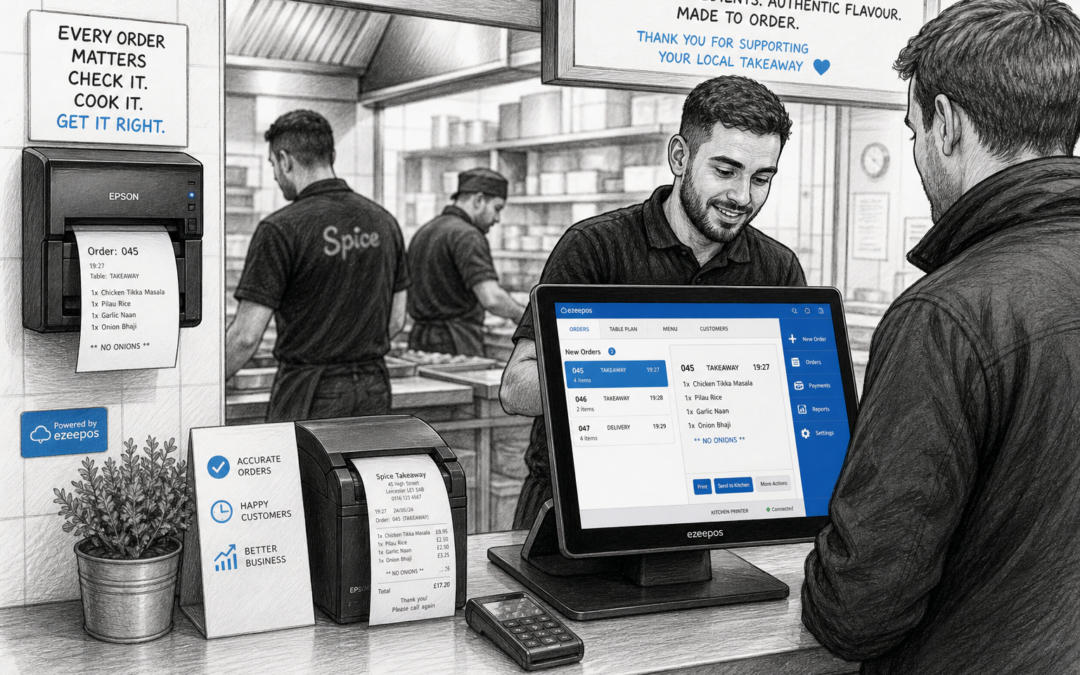
For busy takeaways, speed matters, but accuracy matters just as much. When orders are being taken at the counter, over the phone or through online channels, there is a lot happening at once. A clear kitchen printing setup helps make sure the right information reaches the right place, so food can be prepared with fewer misunderstandings and less last-minute confusion.
At eZeePOS, we work with UK hospitality businesses that need a practical till system rather than a complicated setup. If you want to see how a modern EPOS solution can support takeaway service, visit www.ezeepos.co.uk.
Why kitchen printing is so important in takeaways
Takeaways often operate under pressure. Staff may be taking walk-in orders, answering the phone, managing collection times and keeping an eye on delivery tickets at the same time. In that environment, handwritten notes or shouted instructions can easily lead to missed items, unclear modifications or delays in the kitchen.
A kitchen printer gives the team a printed order ticket with the details they need in a format that is easier to read and act on quickly. That can make a real difference during busy periods, especially when several orders are being prepared at once.
Clear tickets help the kitchen stay organised
When orders are printed directly from the EPOS system, the kitchen receives a consistent record of:
- the items ordered
- quantity and portions
- customer notes or special requests
- collection or preparation details
- allergen or menu information where set up in the system
That clarity helps reduce the chance of staff relying on memory or trying to read notes taken in a hurry. It also gives the kitchen team a shared reference point, which is especially useful when more than one person is handling tickets.
How kitchen printing supports faster service
In many takeaways, the main benefit of kitchen printing is not just accuracy, but pace. A printed ticket can move straight to the prep area, allowing staff to start cooking without waiting for verbal confirmation or repeated checks at the counter.
This is particularly helpful during evening rushes, weekend trade and match days, when orders stack up quickly. Instead of slowing down to recheck details, staff can keep service flowing while still keeping a written record of what needs to be prepared.
Less back-and-forth between counter and kitchen
Without kitchen printing, front-of-house staff may need to keep interrupting the kitchen to repeat items, chase missing details or clarify requests. That takes time and increases the risk of mistakes.
With the right EPOS setup, the order can go straight from the till to the kitchen printer. This gives the team a cleaner handover and helps reduce unnecessary communication during busy service. In a takeaway setting, that can be just as valuable as saving a few seconds at the till.
Better order accuracy means fewer complaints
Order mistakes can be frustrating for customers and time-consuming for staff. A missing side, wrong spice level or overlooked request can disrupt the whole collection process. Kitchen printing helps lower that risk by making order details easier to read and easier to follow.
For the business owner, that matters for more than customer service. Fewer mistakes can mean fewer remakes, fewer awkward conversations and less waste. It also helps create a calmer working environment for the team, especially when the kitchen is already under pressure.
Useful for special instructions and busy menus
Takeaways often deal with menus that include custom options, add-ons and cooking preferences. A printed ticket can help staff spot important notes such as:
- no onions or no sauce
- extra toppings or sides
- spice level requests
- dietary notes
- collection timings
When those details are visible on the ticket, there is less chance of them being missed in the rush of service.
Kitchen printing and touchscreen till workflows
Kitchen printing works best when it is part of a simple, well-planned till workflow. A modern touchscreen POS setup can make it easier for staff to take orders quickly, check details before sending them through and keep service consistent throughout the day.
For takeaway operators, that can be a practical improvement over old-fashioned tills or separate note systems. The aim is not to add complexity, but to reduce the amount of manual handling needed between order-taking and food preparation.
If you are comparing setups for a new or upgraded system, it is worth looking at how the software, screen layout and printer placement all work together. The best setup is usually the one that suits your counter space, staff routine and menu style without creating extra steps.
What to think about when choosing kitchen printing for your takeaway
Not every takeaway needs the same setup. A small counter service with a simple menu may only need one printer in the kitchen, while a larger operation may benefit from more than one print point or a clearer separation between prep areas.
Before choosing a system, think about:
- how many orders you handle in busy periods
- whether orders come from counter, phone or online channels
- how much space you have behind the counter and in the kitchen
- how many staff need to see or act on printed tickets
- what menu notes or instructions need to appear on each order
That kind of planning helps ensure the printer supports the way your business actually works, rather than forcing staff to adapt to a system that does not fit.
Why eZeePOS is a practical fit for busy hospitality businesses
eZeePOS is designed for UK retail and hospitality businesses that want a straightforward EPOS setup they can rely on day to day. For takeaways, that means a system that can support clear order handling, efficient service and a more organised counter-to-kitchen workflow.
It is also worth remembering that kitchen printing is only one part of the wider setup. The best results usually come from combining the right software with suitable hardware and sensible training, so staff feel confident using the system during peak service.
For businesses looking at payment and checkout workflows alongside kitchen print setup, it may also be sensible to discuss card payment integration options such as Teya and Dojo Payments with YCR Distribution, depending on what suits the business model.
Bringing it all together
Kitchen printing is a simple idea, but it can have a big impact on a busy takeaway. It helps the kitchen read orders more clearly, keeps service moving and reduces the risk of avoidable mistakes. For owners, that means a more manageable workflow and a better chance of keeping customers happy during the rush.
If your takeaway is outgrowing a basic till or relying too much on manual communication, it may be time to look at a more practical EPOS setup.
To explore a more organised takeaway till system, visit www.ezeepos.co.uk. Contact YCR Distribution at sales@ezeepos.co.uk or call 01924 438238.
Recent Comments