
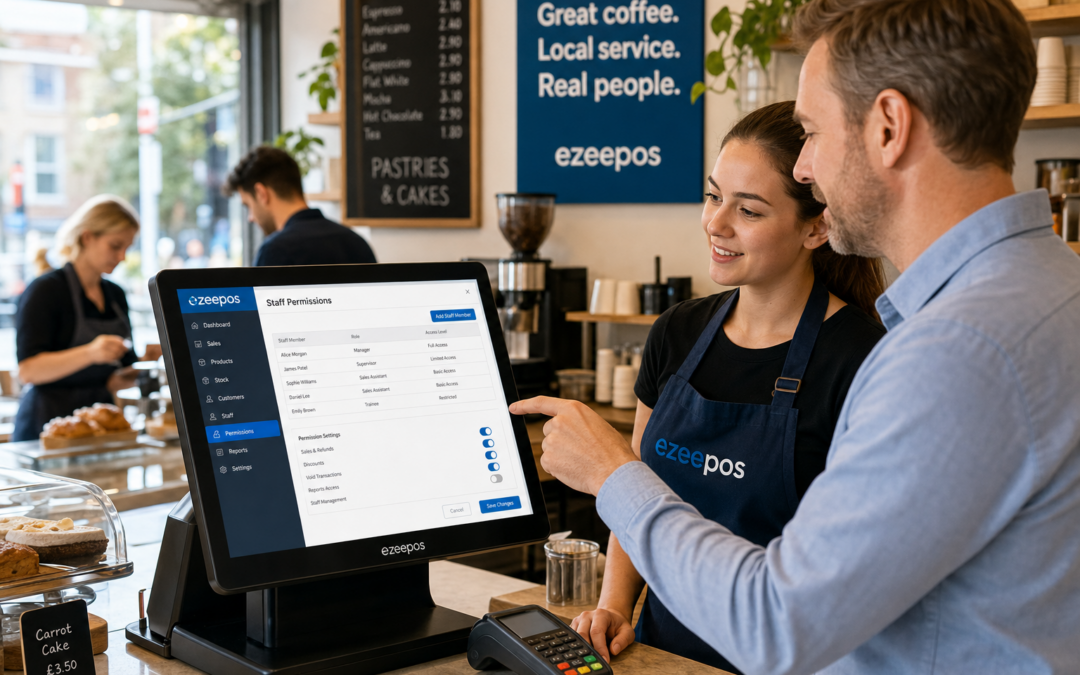
For many UK businesses, the till is where a lot of day-to-day control happens. Sales are taken, discounts are applied, refunds are processed and cash is counted. When everyone has the same access, it can be harder to keep things tidy. That is why staff permissions are such a useful part of a modern EPOS setup.
On the eZeePOS website, you can see how a practical EPOS system can support the way independent retailers, cafés and takeaways work. Staff permissions are not about making service difficult. They are about giving the right people the right access, so the till stays easier to manage during a busy shift.
What staff permissions do in an EPOS system
Staff permissions let a business control which users can see or use certain functions. For example, a team member might be able to take payments and print receipts, but not issue refunds or alter pricing. A supervisor might have broader access, while an owner or manager can review reports, adjust settings and approve sensitive actions.
This is especially useful in businesses where several people use the same counter across the day. It helps keep tasks clear and reduces the chances of one person making a change that affects the whole operation.
Common access settings businesses may want to control
- Refunds and voids
- Discounts and price overrides
- Cash drawer access
- End-of-day functions
- Report viewing and management screens
- Menu, product or price edits
How permissions help reduce mistakes
Busy counters can be distracting. Staff may be serving customers quickly, answering questions and dealing with a queue at the same time. In that environment, small errors can happen easily. A well-structured permission setup helps limit those errors before they become a bigger problem.
If only managers can authorise refunds or large discounts, the business is less exposed to accidental misuse. If pricing changes are restricted, there is less risk of items being edited mid-shift without approval. That makes the till more reliable and the end-of-day count easier to understand.
For retail businesses, this can help prevent confusion when a product is sold at the wrong price or removed from the sale without a clear reason. For hospitality businesses, it can help protect against incorrect voids, unauthorised comps or unplanned bill edits during a rush.
Why permissions matter for trust and accountability
It is not only about preventing errors. Permissions also help create clearer accountability. When each user has their own login, it becomes easier to see who carried out a specific action. That can be useful if a refund needs checking, a till discrepancy appears or a discount needs to be reviewed later.
This is particularly valuable for businesses with part-time staff, shift work or seasonal teams. The more people share the same counter, the more useful it becomes to know which actions were approved, who changed settings and when a sale was adjusted.
Helpful benefits for owners and managers
- Clearer audit trails
- Better oversight of cash handling
- Less reliance on verbal explanations
- Improved confidence in daily reporting
- More consistent use of till functions across the team
Staff permissions in retail settings
In retail, staff permissions are useful when a shop has mixed experience levels on the till. A new starter might only need simple sales access, while a supervisor can handle returns or pricing queries. That keeps the checkout moving without giving away full control of the system.
This can work well in convenience stores, gift shops, fashion retailers and other shops where multiple team members may serve customers across the day. It also helps when the front counter is busy and staff need to stay focused on speed rather than navigating settings they do not need.
Retail businesses often benefit from restricting functions such as markdowns, manager approvals and stock-related edits. It gives the owner more confidence that the till is being used consistently, even when several people are sharing the workload.
Staff permissions in cafés, restaurants and takeaways
Hospitality businesses have their own reasons to use permissions carefully. In a café, restaurant or takeaway, staff may need to take orders quickly, split bills or apply service actions without accessing deeper settings. A structured permission setup can keep front-of-house work moving while protecting more sensitive tasks.
For example, a server may need access to open tables or send orders, but not to alter pricing or close the day. A supervisor might manage voids, discounts and end-of-shift checks. That separation can make service feel smoother and more controlled, especially when the business is busy.
It also helps when training new team members. Rather than giving everyone full access on day one, managers can introduce features gradually and build confidence as staff become more familiar with the system.
Making training simpler for new team members
Good permissions can support staff training as much as day-to-day control. A cleaner, more limited menu of options is often easier for new employees to understand. They can learn the key selling steps first without being overwhelmed by functions they do not yet need.
That is useful in businesses with regular turnover, seasonal hiring or weekend cover. It can also help teams feel more comfortable, because the system is designed around their actual role rather than giving them a long list of controls they may never use.
When staff know what they can and cannot do, they are less likely to make assumptions at the till. That can reduce delays, improve confidence and make the overall checkout experience feel more orderly.
When to review your permission settings
Permissions should not be set once and forgotten. As a business grows, the team often changes too. New managers may join, trusted staff may take on more responsibility and seasonal workers may need limited access for a short period.
It is a good idea to review permissions when:
- New staff join the business
- Roles change within the team
- There are repeated till errors
- Refunds or discounts need better oversight
- You want clearer end-of-day control
Keeping these settings up to date can help the EPOS system continue supporting the way the business really operates, rather than staying stuck in an old structure.
A practical feature for busy UK businesses
Staff permissions may not be the most visible part of an EPOS setup, but they are one of the features that can make the biggest difference behind the scenes. They help reduce mistakes, protect sensitive functions and give owners a clearer picture of what is happening at the till.
For independent UK businesses that rely on fast service and shared responsibility, that kind of control is valuable. Whether you run a retail counter, a café or a takeaway, the right permission setup can help the whole team work with more confidence.
If you are reviewing your options for a modern EPOS system, it is worth looking at how permissions fit into the wider setup. A well-organised till can save time, support training and make daily trading feel far more manageable.
To find out more about practical EPOS options for UK businesses, visit www.ezeepos.co.uk. Contact YCR Distribution at sales@ezeepos.co.uk or call 01924 438238.
Recent Comments