
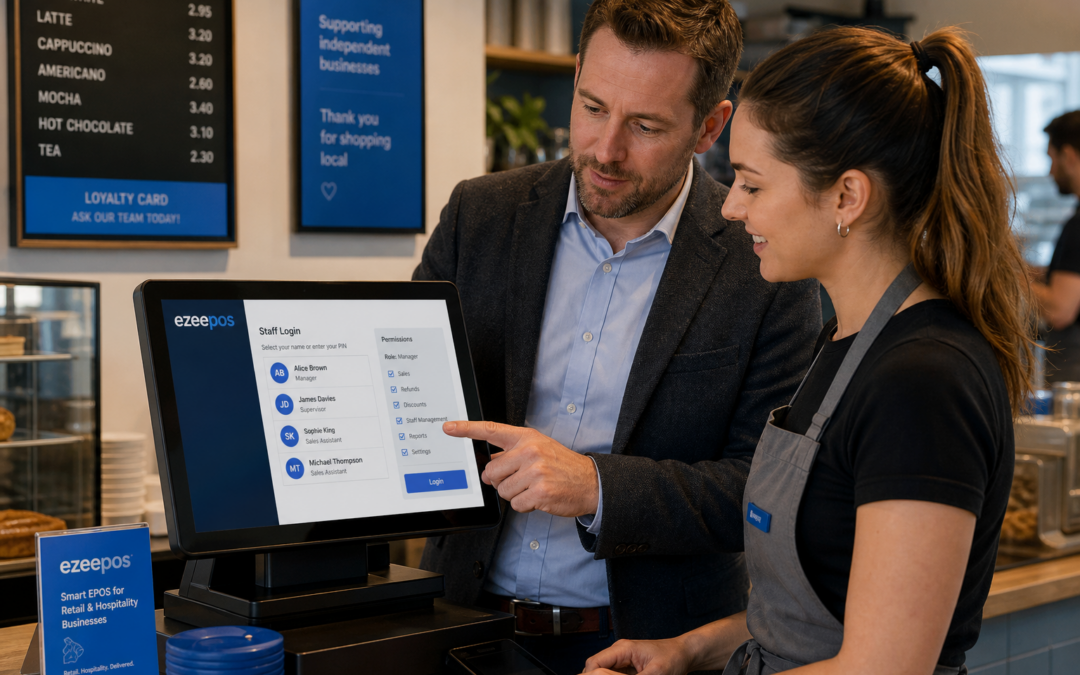
As businesses expand, the till can quickly become one of the busiest and most sensitive parts of daily operations. Whether you run a shop, cafe, restaurant, pub or takeaway, giving every team member the same level of access is rarely the best approach. Staff permissions can help you keep control without slowing service down.
For growing businesses, this is one of the most practical features to consider when choosing an EPOS system. If you are reviewing your setup, eZeePOS is a UK EPOS and POS software option worth exploring, especially for businesses that want a clearer way to manage staff activity and keep service running smoothly.
What staff permissions do in an EPOS system
Staff permissions let you decide who can do what at the till or POS terminal. Instead of every user having access to every function, you can limit certain actions to managers or specific team members.
That might include refund approval, voiding items, editing discounts, opening the cash drawer, changing prices, or viewing more detailed reports. The exact setup will depend on the EPOS software you choose, but the principle is the same: different roles should have different levels of access.
Why this matters in day-to-day trading
In a busy trade environment, small errors can add up quickly. A casual mistake on a discount, an accidental refund or a price change made by the wrong person can create confusion later in the day. Staff permissions help reduce those risks by making the till easier to control.
They also support confidence. A new starter who only needs to take orders or accept payments does not need access to every back-office function. A manager handling cashing up or end-of-day checks may need broader access, but not everyone on shift will.
Benefits for retail businesses
In retail, permissions can be especially useful for stores that have a mix of experienced staff, part-time workers and seasonal team members. A convenience store, gift shop or clothing retailer may want to keep certain actions restricted while still making checkout quick and simple.
- Less risk of incorrect refunds or voids during busy trading periods
- More control over staff discounts and manual price changes
- Clearer accountability if something needs to be reviewed later
- Better support for temporary staff who only need basic till access
For independent retailers, this is often about practical control rather than complicated administration. The aim is to keep customer service moving while protecting the parts of the system that need oversight.
Benefits for hospitality businesses
In hospitality, the need for permissions is often even greater because service can move very quickly. In cafes, restaurants, bars and takeaways, staff may need to take orders, split bills, apply discounts or handle customer payments at pace. At the same time, some actions should only be available to supervisors or managers.
That is especially useful when you have a mix of front-of-house staff, kitchen team members and shift leaders. A robust hospitality EPOS setup can help make those responsibilities clearer without adding unnecessary steps for the team.
Common permission settings in hospitality
- Restricting refunds to management
- Limiting discount approval to senior staff
- Allowing only selected users to edit order details after sending to the kitchen
- Controlling who can access cashing-up or reporting functions
- Setting separate access for different roles across front of house and back of house
These controls help businesses maintain a smoother flow during service. They also reduce the chance that a busy shift leads to avoidable mistakes at the till.
Supporting accountability without slowing service
Good staff permissions are not about making the till harder to use. They are about giving each team member the right level of access for their role. When permissions are set carefully, staff can still work quickly, while owners and managers keep better oversight of sensitive actions.
This can be useful for cash handling too. If only selected users can open the drawer, approve a cancellation or process certain adjustments, it becomes easier to review what happened if something does not match at the end of the day.
For growing businesses, that level of accountability can be helpful when training new team members, dealing with shift changes or checking how the business is operating across different times of day.
Making permissions work as your team grows
One of the biggest advantages of EPOS software over a basic till is flexibility. As your business grows, roles tend to become more specific. A junior member of staff may only need checkout access, while a supervisor may need to manage tables, discounts or refunds, and an owner may want access to full reporting.
It is worth reviewing permissions regularly rather than setting them once and forgetting about them. If your team changes, or your business adds new services, the access levels may need to be adjusted. That keeps the system practical and reduces the chance of staff using functions they do not need.
Staff training still matters
Permissions work best when they are supported by good staff training. Team members should understand not just how to use the till, but why certain features are restricted. That helps avoid frustration and makes the system easier to adopt. It also gives managers more confidence that the settings are being used properly.
Choosing an EPOS system with control in mind
If you are comparing EPOS options, staff permissions should be part of the conversation. They are one of those features that may seem small at first, but they can have a big impact on control, accuracy and confidence over time.
For UK retailers and hospitality businesses, a system such as eZeePOS can provide a practical way to manage access while still keeping service straightforward. If you are planning a new setup or reviewing your existing system, it is worth checking how user roles, restrictions and manager access are handled before you commit.
To learn more about eZeePOS and how it can support your business, visit www.ezeepos.co.uk.
Contact YCR Distribution at sales@ezeepos.co.uk or call 01924 438238.
Recent Comments