
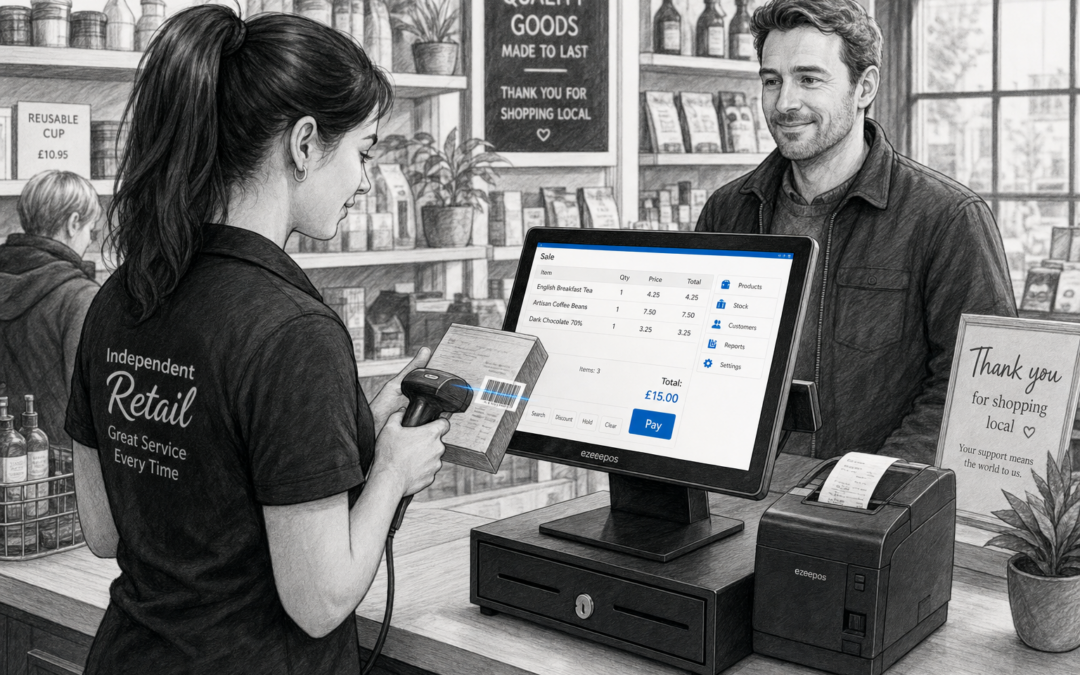
For many independent retailers, the checkout is where service speed really matters. If staff have to type in product names manually, search through categories or guess prices, queues can build up quickly. Barcode scanning offers a simple way to make the till faster, more accurate and easier to use day to day.
With a well-set-up EPOS system such as eZeePOS, barcode scanning becomes part of a smoother checkout routine rather than an extra step. It helps staff identify items quickly, reduces typing mistakes and keeps customers moving, especially during busy periods.
Why barcode scanning makes such a difference at the till
In a retail setting, speed and accuracy go hand in hand. Every extra second spent searching for a product or correcting a wrong entry can slow the queue and make the checkout feel less efficient. Barcode scanning helps by linking each product to its unique code, so staff can add items to the sale with a quick scan instead of manual input.
That can be especially useful in shops with:
- a wide product range
- repeat purchases and everyday essentials
- busy peak times such as lunch breaks or weekends
- new or part-time staff who need a simple till process
For customers, that usually means a quicker and more straightforward experience. For staff, it means less pressure at the counter and fewer opportunities for mistakes.
How barcode scanning supports independent retailers
Independent shops often need practical systems that are easy to learn and quick to run. Barcode scanning fits that need well because it keeps the checkout process consistent. Once products are set up properly in the EPOS system, staff only need to scan the item to bring it into the sale.
This can be useful in a range of retail environments, including convenience stores, gift shops, pet shops, hardware stores and fashion retailers. In each case, the benefit is much the same: a cleaner till process and less time spent searching for items.
Less manual input, fewer mistakes
Typing product names by hand increases the chance of errors. A barcode scanner helps reduce that risk by selecting the correct item automatically. That matters when:
- products look similar but have different prices
- customers buy multiple items in one transaction
- staff are serving quickly during busy trading hours
It also makes refunds, exchanges and price checks easier to handle because the item is already in the system.
Quicker training for new staff
A barcode-based checkout is generally easier to learn than a more manual till process. New team members can get confident faster because scanning becomes a repeatable routine. That can be a real advantage in shops with seasonal staff, part-time workers or changing rotas.
Barcode scanning and better queue management
Queue length is often about more than how many customers are in the shop. It is also about how quickly each transaction can be completed. Barcode scanning helps shorten the time spent per sale, which can make a real difference at busy times.
That is particularly important if your store has a small counter or only one checkout point. A faster scan-and-go process helps staff keep the line moving without rushing the customer experience.
If your business often sees busy bursts throughout the day, barcode scanning can be part of a wider effort to reduce checkout delays and keep service steady.
What to consider when setting up barcode scanning
Barcode scanning is straightforward in principle, but it works best when the rest of the setup is prepared properly. The scanner, till and product database all need to work together in a practical way.
Product setup matters
Each item needs to be entered correctly into the EPOS system with the right barcode linked to the right product. If product records are messy or incomplete, scanning will not give you the speed benefit you are looking for.
The scanner should suit your counter
Some retailers prefer a handheld barcode scanner, while others want a fixed scanner at the till. The right choice depends on the amount of counter space you have, how quickly you serve customers and whether staff need to scan bulky items such as pet food, DIY products or large gift items.
Hardware layout should feel natural
If the scanner is awkward to reach or the till area feels cluttered, the process becomes less efficient. A good retail setup keeps the scanner, touchscreen till and receipt printer within easy reach so staff can work comfortably.
How barcode scanning works alongside other EPOS features
Barcode scanning is most effective when it is part of a complete retail till setup rather than a stand-alone tool. It works well alongside features such as product lookup, stock visibility, promotions and sales reporting.
For example, if a barcode scan brings up the correct item immediately, staff can then apply any relevant discount, check pricing and complete the sale without slowing the customer down. That combination is especially useful in shops that need a simple but professional daily workflow.
Retailers using eZeePOS can build a checkout process that feels practical for the shop floor, while still giving managers more control over everyday trading.
When barcode scanning is most valuable
Barcode scanning is not only for large supermarkets or busy chain stores. It can be just as valuable for smaller independent businesses that want to save time at the till without making the system complicated.
It is particularly helpful if your business:
- sells a mix of branded and own-label products
- needs faster checkout during peak trade
- has frequent staff changes or seasonal hires
- serves customers who expect a quick and accurate checkout
In those situations, a reliable scanner can make everyday trading feel more organised and less stressful.
Choosing a practical EPOS setup for your shop
If you are thinking about barcode scanning for your retail business, it is worth looking at the bigger picture too. The best results usually come from a setup that combines the right software, the right hardware and clear day-to-day workflows.
That means choosing a till system that is easy for staff to use, supports your product range and keeps checkout tasks simple. For many independent retailers, that is where a modern EPOS platform can offer real value.
To learn more about retail-ready EPOS options and practical till setups, visit www.ezeepos.co.uk.
Contact YCR Distribution at sales@ezeepos.co.uk or call 01924 438238.
If you are planning a new retail setup or improving an existing one, eZeePOS can help you build a checkout process that feels quicker, neater and easier to manage.
Recent Comments