
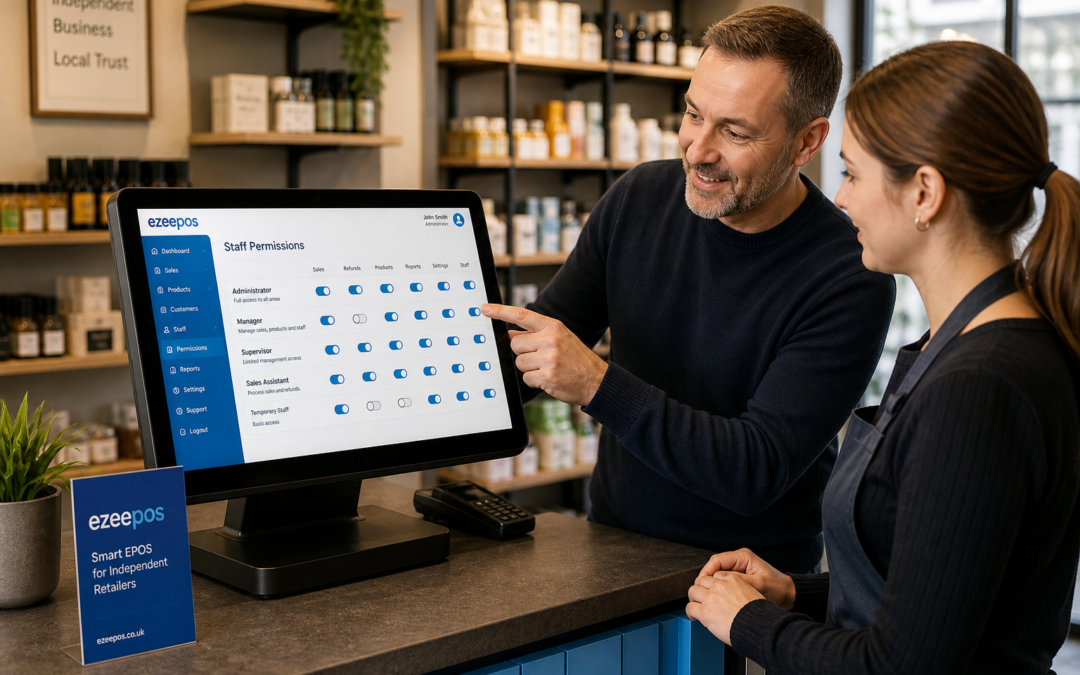
Running an independent shop means trusting your staff to serve customers well while keeping day-to-day operations under control. A well-set-up EPOS system can help with that, and one of the most useful features is staff permissions. If you want a practical UK EPOS solution, eZeePOS is designed to support retail businesses that need a straightforward, organised till setup.
To learn more about the wider system, you can also visit www.ezeepos.co.uk. Staff permissions may not sound like a major feature at first, but for a small shop they can make a noticeable difference to control, accountability and confidence at the till.
What staff permissions do in retail EPOS
Staff permissions let you decide what each user can see and do on the till system. In simple terms, they help you control access to different parts of the EPOS, rather than giving everyone the same level of freedom.
That can include things such as:
- opening or closing the till
- issuing refunds or voids
- applying discounts
- changing product prices
- editing settings or reports
- accessing management functions
For independent retailers, this is useful because not every team member needs the same level of access. A new part-time cashier may only need the tools required to complete sales, while a supervisor or owner may need more detailed access for approvals and reporting.
Why independent shops benefit from clearer access control
Independent shops often run with small teams, varied shift patterns and busy periods where people cover more than one role. That makes clear access control especially valuable. It helps keep the till system simple for front-line staff while protecting the parts of the EPOS that should only be changed by trusted users.
Helping reduce avoidable mistakes
When everyone has access to every function, it is easier for settings to be altered accidentally or for a simple scan-and-pay process to be interrupted by the wrong action. Staff permissions reduce that risk by limiting access to the tools each person actually needs.
That can be particularly helpful in shops where tills are shared between different team members across the day. With a clearer setup, staff are less likely to make changes they do not fully understand.
Supporting accountability
If a refund is processed, a discount is applied or a till setting is changed, permissions help make it clear who was allowed to do it. That does not create extra pressure on your team; instead, it gives you a more reliable record of activity and makes it easier to review what happened if something needs checking later.
Protecting pricing and promotions
Many shop owners spend time carefully setting prices, offers and promotional rules. Staff permissions help protect that work. If only selected users can alter discounts or edit items, you reduce the risk of changes that could affect margins or cause confusion at the checkout.
Common permission settings that small retailers use
Every shop is different, but many retailers find it useful to create simple user levels. This keeps the system easy to understand without making it rigid.
Cashier access
This is usually the most limited level. Staff can serve customers, process sales, take payments and maybe look up products, but they cannot change core settings or approve sensitive actions.
Supervisor access
Supervisors may need a little more flexibility. They might be able to handle returns, authorise discounts or review certain reports, while still being restricted from full admin changes.
Owner or manager access
This level is usually reserved for the business owner or senior management. It allows full control over pricing, settings, reporting and user management, which is useful for keeping the whole system organised.
Why permissions matter during busy retail periods
Independent shops often feel the pressure during weekends, seasonal peaks and lunch-hour rushes. In those moments, the till needs to be simple and dependable. Staff permissions help by giving front-line users a cleaner screen and fewer unnecessary options.
That can make training easier too. New staff do not need to learn every management function on day one. They can focus on the actions that matter most at the counter, such as scanning items, finding products and completing a sale correctly.
Permissions and customer service go hand in hand
Good staff permissions are not just about control. They also support faster, more confident customer service. If staff know exactly what they can do, they are less likely to hesitate or ask for manager approval for every small action. At the same time, the system still protects higher-risk functions.
That balance is useful in convenience stores, gift shops, fashion shops and other independent retail environments where service speed matters but accuracy matters just as much.
Keeping admin simple for the business owner
For smaller retailers, one of the biggest advantages of EPOS permissions is reduced admin. Instead of constantly correcting errors or checking whether a setting has been changed, the owner can set clear rules in advance and let the system support them day to day.
This can also make staff changes easier. If someone leaves, changes role or starts working fewer hours, you can adjust their access rather than rebuilding the whole setup from scratch.
How to think about permissions when choosing EPOS software
If you are comparing EPOS systems, it is worth asking how staff permissions work in practice. A good retail EPOS should make it easy to control user access without making the till difficult to use. Look for a system that suits the size of your business and the way your team actually works.
You may also want to ask how permissions link to reports, refunds, discounts and manager approval. The best setup is one that feels practical rather than overcomplicated.
A sensible feature with everyday value
Staff permissions are not the most visible part of a retail EPOS system, but they are one of the features that can have a steady, everyday impact. For independent shops, they help protect the business, support staff confidence and keep the till running more smoothly.
If you are looking for a UK EPOS option that supports this kind of practical control, eZeePOS is worth exploring. Contact YCR Distribution at sales@ezeepos.co.uk or call 01924 438238. You can also find more information at www.ezeepos.co.uk.
Recent Comments