
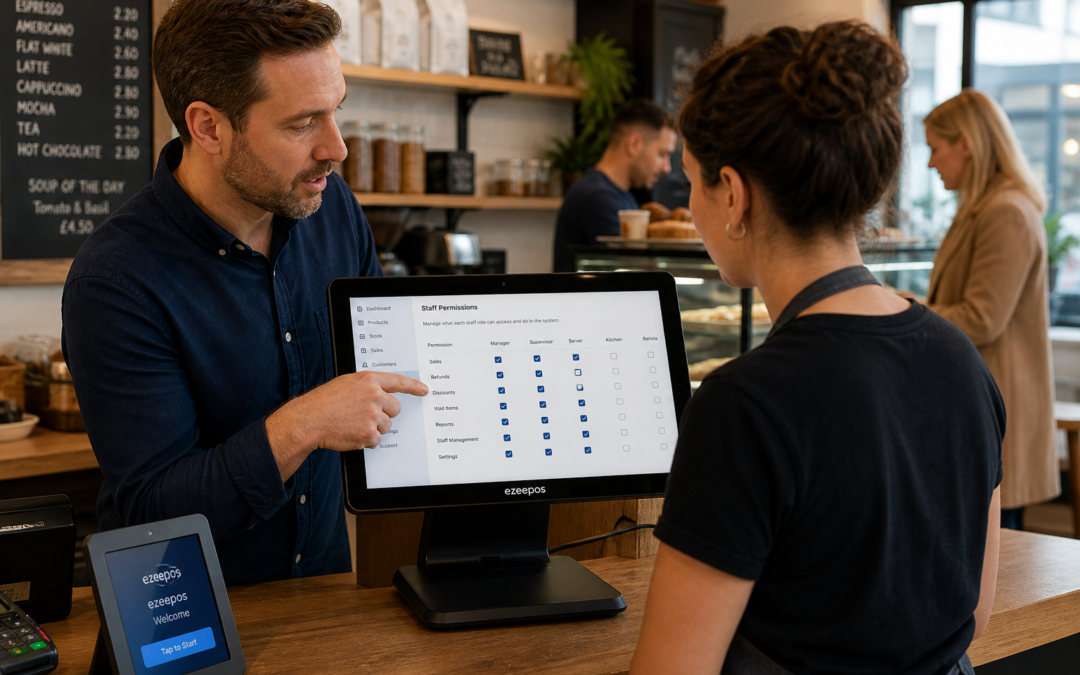
If you run a busy shop, café, restaurant or takeaway, not every team member needs access to every part of your till system. Clear staff permissions can make day-to-day work safer, simpler and more controlled, while still allowing staff to serve customers quickly.
For UK businesses, this is one of those EPOS features that can make a practical difference without adding complexity. With a well-structured setup from eZeePOS, you can decide who can do what, reduce avoidable errors and keep sensitive areas of the system where they belong.
What staff permissions do in an EPOS system
Staff permissions let you control which actions each user can carry out on the till. That might include simple things such as taking orders and processing sales, or more restricted tasks such as voiding transactions, issuing refunds, changing prices or viewing management reports.
In practice, this helps create a system that matches how your business actually works. A new starter may only need basic selling functions at first, while supervisors or managers may need access to more detailed settings and end-of-day tools.
Common permission levels businesses may use
- Basic till access for serving customers and completing sales
- Supervisor access for refunds, voids and till checks
- Manager access for reports, settings and higher-level approvals
- Admin access for setup, user management and system changes
Why permissions matter for UK retail and hospitality
In many businesses, the till is used by several staff members during a single day. That is normal, but it can become harder to keep track of errors, mistakes or accidental changes if everyone has the same access. Staff permissions help create clearer responsibility across the team.
For retailers, that can mean fewer pricing mistakes and better control over sensitive functions. For hospitality venues, it can help protect items such as refunds, bill amendments and discounts during busy service. In both cases, it supports smoother trading without making the checkout or ordering process feel heavy-handed.
Helping new staff settle in
Permissions can also support training. When a new starter only sees the tools they need, it is often easier for them to learn the system properly. They can focus on taking orders, serving customers and using the till with confidence, rather than worrying about settings they do not need yet.
This approach can be especially useful in cafés, takeaways and shops that hire seasonal or part-time staff. A simpler screen and fewer available actions can reduce confusion during busy periods.
Keeping mistakes and misuse under control
Not every till issue is a major problem, but small errors can still cost time. A misplaced refund, an accidental price change or an unchecked discount can create extra admin later in the day. Staff permissions help reduce those risks by limiting who can make certain changes.
That does not mean locking everything down so tightly that staff cannot work efficiently. The aim is balance. Good permissions should support fast service at the counter while keeping management functions separate.
Useful controls to consider
- Refund approval for higher-value transactions
- Void permissions for cancelled sales or mistaken entries
- Discount controls for promotions and staff offers
- Price editing restrictions for selected users
- Report access for managers only
How permissions support better accountability
When several people share a till, it helps to know who did what and when. A structured permission setup makes it easier to assign actions to the right user, which can support clearer accountability at the end of the day.
That is useful if you need to review an unusual transaction, check how a refund was handled or understand why a discount was applied. It can also help managers spot training needs without having to guess where a problem started.
Useful for shops, cafés, restaurants and takeaways
Staff permissions are not just for large businesses. Independent retailers and hospitality operators often benefit just as much, especially when a small team shares a busy counter or service area. A simple permissions setup can keep the system practical for day-to-day use while protecting the parts of the till that need closer control.
For example, a gift shop may want to limit price changes and refunds, while a restaurant may want to restrict bill adjustments and discount approvals. A takeaway might prefer to let front-of-house staff take orders freely, but reserve certain functions for supervisors during peak hours. The exact setup should reflect your operation, your team and your working style.
Staff permissions and reporting work well together
Permissions become even more useful when combined with clear reporting. If managers can view transaction patterns, staff logins and key sales data, they are better placed to understand what is happening across the day. That makes it easier to identify training gaps, monitor service patterns and keep the till running as intended.
If reporting is part of your day-to-day decision-making, you may also find our article on using reports to make better decisions helpful. Together, permissions and reporting can give you a clearer picture of how your EPOS is being used.
Why a practical EPOS setup matters
Staff permissions are one part of a wider system designed to make trading easier rather than harder. The best EPOS setups give each user the access they need, keep management controls sensible and support a smoother customer experience at the same time.
That practical approach is one reason many businesses look at eZeePOS when choosing software for retail or hospitality. It is about giving teams the right tools for the job, rather than overwhelming them with unnecessary options.
If your business is growing, or if several people use the till each day, it is worth reviewing whether your current permissions setup still fits the way you work. A few sensible changes can make a noticeable difference to speed, control and confidence.
For more information about how eZeePOS can support your business, visit www.ezeepos.co.uk.
Contact YCR Distribution at sales@ezeepos.co.uk or call 01924 438238.
Recent Comments