
As a business gets busier, the till can become the place where small mistakes turn into bigger problems. That is one reason why staff permissions are such a useful feature in a modern EPOS system. For independent retailers, cafés, restaurants, takeaways and other busy UK businesses, permissions can help control who can do what, without slowing service down.
If you are reviewing your setup with eZeePOS, staff permissions are worth considering early. They are not about making the till harder to use. They are about giving the right people the right access, so routine service stays quick while sensitive actions stay protected. You can find out more about practical EPOS features at www.ezeepos.co.uk.
What are staff permissions in EPOS?
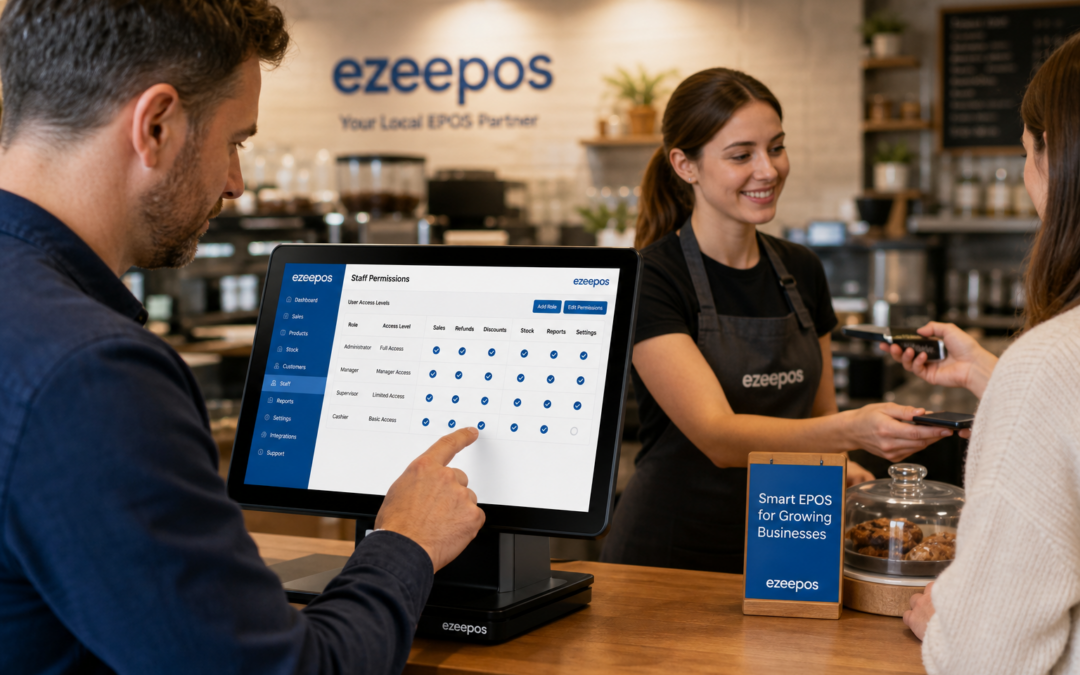
Staff permissions let you decide which users can access certain functions on the till or POS system. In simple terms, a shop assistant, server, supervisor and manager do not all need the same level of control.
A basic team member may only need to process sales, apply a few standard actions and print receipts. A supervisor might need access to refunds, voids or discounts. A manager may need to review reports, override restrictions or make changes to settings. That separation can make a real difference in both retail and hospitality settings.
Common permission levels
- Sale processing and refunds
- Discounts and promotions
- Void or cancel functions
- Cash drawer and till adjustments
- End-of-day or reporting access
- Menu, price or product changes
- Admin-level settings and user control
Why permissions matter for growing businesses
When a business has only one or two people using the till, access control may not feel urgent. But as soon as you add more team members, shift changes or a mix of seniority, the risk of accidental errors goes up. That is true whether you run a busy coffee shop, a high street retailer or a takeaway with several staff on each shift.
Staff permissions help in three important ways:
- They reduce mistakes: Staff only see the functions they need, which lowers the chance of incorrect refunds, discounts or voids.
- They improve accountability: When users have individual logins, it is easier to understand who carried out a particular action.
- They protect sensitive actions: Important changes can be limited to supervisors or managers rather than every team member.
That balance is especially helpful during busy periods, when staff are under pressure and quick decisions matter.
How permissions support retail shops
In retail, staff permissions can be used to keep the checkout process smooth while protecting the parts of the system that affect margin, reporting and cash handling. For example, a customer-facing colleague may need to scan items, apply a standard discount where allowed and complete the sale. A manager might be the only person who can process a refund above a certain value or override an exception.
This is particularly useful in businesses where part-time staff, seasonal workers or new starters are on the till. Clear permissions make training easier because each person only needs to learn the functions that matter for their role. That can help reduce hesitation at the checkout and keep queues moving.
Practical retail examples
- A gift shop limits high-value refunds to the manager on duty
- A clothing store restricts manual discount overrides to supervisors
- A convenience store allows cashiers to process sales but not alter product records
How permissions help cafés, restaurants and takeaways
Hospitality businesses often work at speed, so permissions need to support service rather than interrupt it. A server may need quick access to table orders, split bills or reprints, while a manager may handle voids, refunds or wide-reaching discount changes. With the right setup, staff can still move quickly at the counter or table without having unnecessary access to back-office functions.
This can be especially helpful in venues with mixed experience levels. New front-of-house staff can focus on taking orders accurately, while more experienced users handle exceptions. That makes the till safer to use during lunch rushes, evening service and weekend peaks.
Examples in hospitality
- A restaurant limits bill adjustments to supervisors
- A takeaway allows counter staff to take orders but not alter settings
- A pub keeps voids and cashing-up controls with management
Permissions and better day-to-day control
Permissions are not just about security. They can also improve the quality of your day-to-day management. If the system shows which user completed an action, it becomes easier to review unusual activity, identify training needs and spot patterns that might otherwise be missed.
That can be useful if you are trying to understand recurring errors, repeated voids or unexpected discounts. Instead of making assumptions, you can look at the till activity more clearly and take a practical approach to coaching or process changes.
For many owners, that visibility is one of the most valuable parts of a modern EPOS system. It is not about policing staff. It is about running a tighter, more reliable operation with fewer surprises.
Training becomes simpler too
Another benefit is that permissions can make staff training less overwhelming. Not every employee needs immediate access to every function, which means new starters can learn the basics first. Once they are confident, access can be expanded where appropriate.
This staged approach can be reassuring for both the business and the team. Staff are less likely to feel overloaded, and managers can build confidence gradually. In a busy shop, café or restaurant, that can make onboarding smoother and reduce early mistakes.
Choosing an EPOS setup that suits your team
If you are reviewing EPOS options, it is worth asking how user permissions are handled and whether they can be tailored to your business structure. A good system should make it straightforward to set different access levels for cashiers, servers, shift leaders and managers. It should also be easy to manage as your team changes over time.
For growing UK businesses, that flexibility can be just as important as speed at the till. The right setup should support service, protect sensitive actions and make management more consistent across shifts and locations.
Bringing permissions into your wider EPOS plan
Staff permissions work best when they are part of a wider approach to running your business well. Combined with sensible reporting, clear user roles and a practical till setup, they can help you stay organised without adding unnecessary complexity.
If you are looking at modern EPOS software for retail or hospitality, eZeePOS offers a practical route to better control at the till. It is designed for UK businesses that want a straightforward system that supports everyday trading.
To discuss your setup and see whether it suits your business, visit www.ezeepos.co.uk.
Contact YCR Distribution at sales@ezeepos.co.uk or call 01924 438238.
Recent Comments