
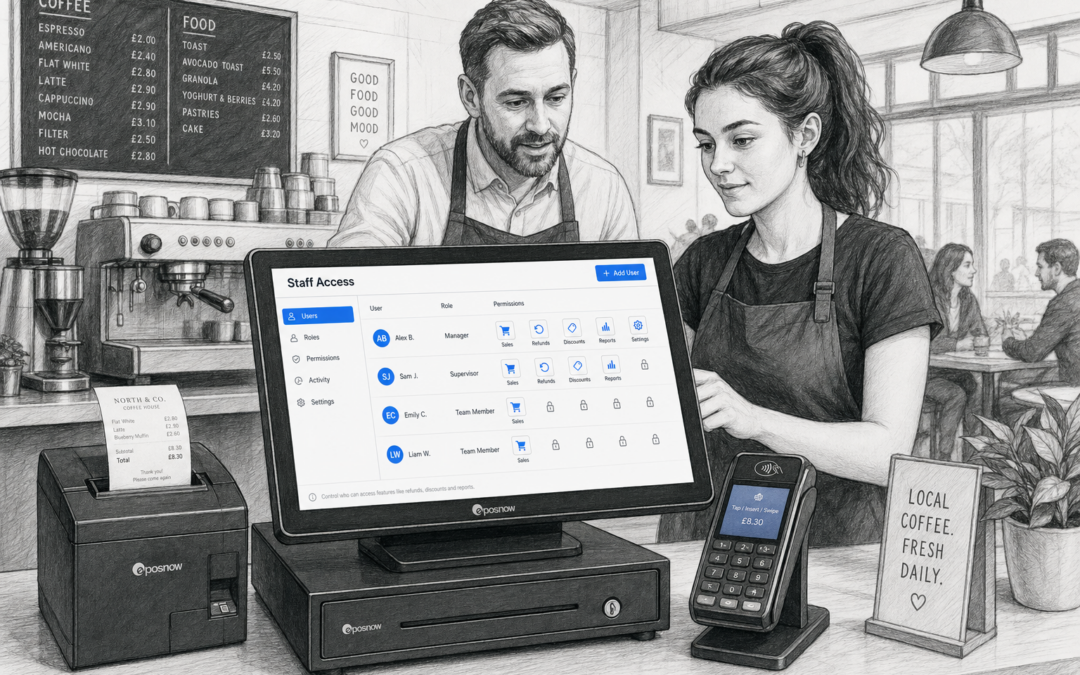
Every busy till has moments where things can go wrong. A refund is processed too quickly, a discount is applied without approval, or a report is opened by someone who does not need access to it. That is where staff permissions become a practical part of day-to-day EPOS management.
For independent UK businesses, permission settings are not just about control. They help create a better balance between speed, trust and accountability. Whether you run a shop, cafe, bar or takeaway, a well-planned setup can help staff work confidently while giving owners greater oversight. If you are looking at a modern EPOS system for your business, eZeePOS is designed to support a more organised till environment for retail and hospitality teams.
What staff permissions do in an EPOS system
Staff permissions let you decide what different team members can see and do at the till. Instead of giving everyone the same access, you can tailor the system to match roles and responsibilities.
In practical terms, that might mean:
- Allowing supervisors to authorise refunds or voids
- Restricting discount changes to managers
- Limiting access to sensitive reports
- Preventing accidental edits to products or prices
- Keeping cash handling and reconciliation more controlled
This approach makes sense for businesses where several people use the same till across different shifts. It also helps when new starters are learning the system, because they can focus on the parts they need without being overwhelmed by every function at once.
Why permissions matter in busy retail environments
Retail tills often need to move quickly, especially at peak times. In a convenience store, gift shop or fashion shop, staff are usually juggling customers, stock lookups and payment steps all at once. Clear permission settings can stop smaller mistakes becoming bigger problems.
Reducing everyday errors
If every team member can change prices, apply discounts or process refunds, the chance of inconsistency goes up. Even well-trained staff can make mistakes during a busy spell. Restricting certain actions to senior staff gives the business a useful safety net.
Protecting pricing and margin
In retail, even small unauthorised discounts can affect margin over time. Staff permissions help owners keep offers consistent and reduce the risk of prices being altered incorrectly. That is especially useful in businesses with mixed product ranges or frequent promotion changes.
Making handovers easier
Where several people use one till across the day, permissions can make shift handovers smoother. Managers can quickly see which user carried out a transaction, which makes it easier to review activity and answer customer queries later.
Why hospitality businesses benefit too
In cafes, restaurants, bars and takeaways, the till is not only a payment point. It is also part of service flow, order handling and team management. That makes staff permissions particularly useful during busy service periods.
For example, you may want front-of-house staff to take orders and process payments, while managers handle refunds, corrections or report access. In a takeaway, permissions can help prevent accidental changes to order values or menu items when speed is the priority. In a restaurant, they can support smoother table service by keeping sensitive functions in the right hands.
By limiting high-risk actions to the right people, businesses can reduce disruption during service and keep staff focused on customers rather than on correcting till issues.
Common permission settings worth considering
Not every business needs the same level of control. The best setup depends on your team size, trading style and how much responsibility you want each role to have. When setting up your EPOS, it is usually worth thinking about the following areas.
Refunds and voids
These are some of the most important functions to restrict. They can affect cash control, stock records and reporting accuracy, so many businesses prefer manager approval or limited access.
Discounts and promotions
If discounts can be altered too freely, offers may be applied inconsistently. Permission controls help keep promotions clear and in line with business policy.
Cash drawer access
In some setups, access to cash handling functions may be limited to specific team members. This can help with accountability and improve end-of-day checks.
Reporting and admin access
Some reports contain information that should stay within management. Permissions make it easier to keep sales data, performance reports and user activity more secure.
Product and price editing
For many businesses, product changes should only be made by owners or managers. This reduces the risk of accidental edits that could affect trading or reporting.
How permissions support staff training
New users often feel more confident when their access matches their role. A well-planned permission setup can support training by making the system easier to learn step by step. Rather than presenting every option at once, you can start with the core tasks a team member needs for their job.
This can be especially useful in seasonal retail, hospitality venues with high turnover, or businesses that recruit part-time staff. It helps keep training simpler and reduces the chance of a new starter making a costly mistake while still learning the ropes.
Keeping control without slowing service
Good permissions should support service, not get in the way of it. The aim is to create a system where staff can work quickly and confidently, while managers retain oversight where it matters most.
That balance is one of the main reasons many businesses move away from basic tills or manual processes. A modern EPOS system can help set clear boundaries without turning simple tasks into a hassle. With the right configuration, permission controls become part of a smoother daily routine rather than an extra admin burden.
Choosing an EPOS setup that fits your team
When reviewing EPOS options, it is sensible to ask how user access will work in real life. Think about how many staff use the till, who needs full access, and which tasks should be restricted. A good system should make those choices straightforward to manage.
If you are planning a new setup or improving an existing one, it is worth looking at the wider package too. Software, hardware and support all play a part in making staff permissions genuinely useful. A tidy touchscreen till, clear user logins and sensible role settings can all help create a more reliable system for everyday trading.
For UK businesses wanting a practical and organised EPOS solution, eZeePOS offers a straightforward way to manage day-to-day till control alongside other useful features. You can find more information at www.ezeepos.co.uk.
Contact YCR Distribution at sales@ezeepos.co.uk or call 01924 438238.
Short call to action: If you want a more controlled and organised till setup for your retail or hospitality business, explore eZeePOS and see how the right permissions can help your team work more confidently.
Recent Comments