
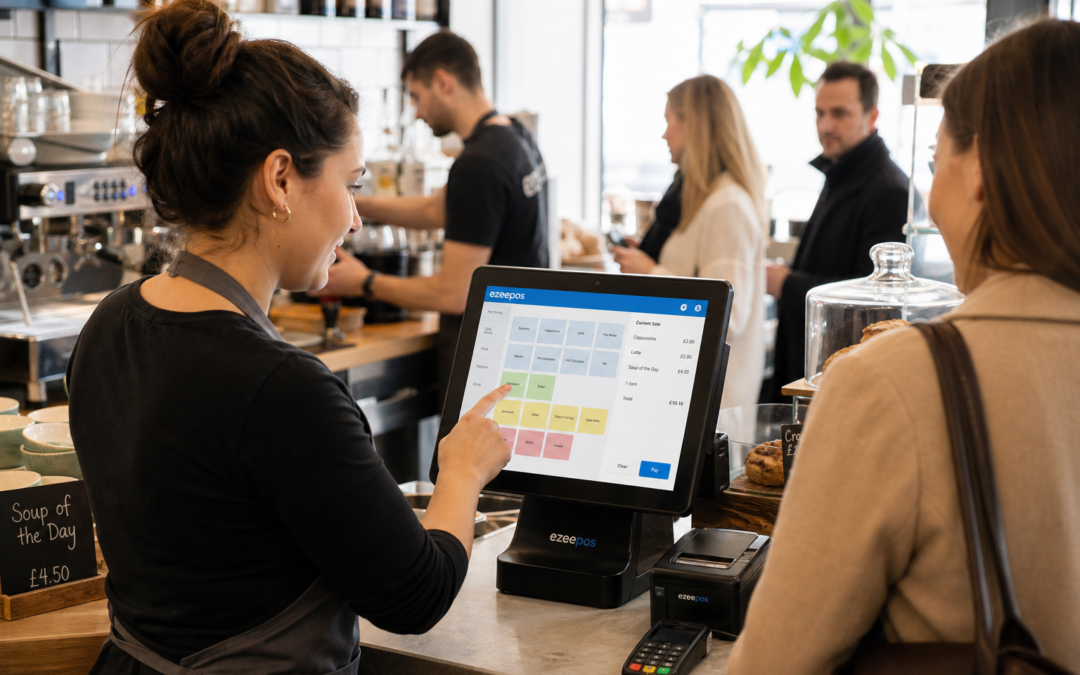
If your counter gets busy at peak times, the till system you choose can have a real effect on service speed, staff confidence and the overall customer experience. A well-chosen touchscreen till should make everyday tasks feel straightforward, not add extra pressure when queues are forming.
For many independent retailers, cafés, takeaways and hospitality venues, the question is not whether to upgrade from a basic cash register, but what kind of touchscreen setup will actually suit the way the business works. At eZeePOS, the focus is on practical EPOS software that helps UK businesses keep trading smoothly without making the till more complicated than it needs to be. You can find more about the system at www.ezeepos.co.uk.
Why the right touchscreen till matters
A touchscreen till is not just a modern-looking alternative to a traditional register. It is often the main point where sales, service speed and staff workflow all meet. When it is set up well, it can help teams move through transactions more confidently and with fewer interruptions.
For a busy counter, that can mean:
- faster item selection during peak periods
- fewer mistakes when staff are under pressure
- less time spent searching through menus or paper lists
- a cleaner, more organised counter space
- an easier system for new staff to learn
Those benefits matter whether you are serving lunch rush in a café, handling a steady flow of retail customers, or moving quickly through takeaway orders.
What to look for in a busy counter setup
Clear screen layout
The best touchscreen till for a busy counter is one that makes sense to staff at a glance. Product buttons, department groups and common tasks should be easy to find, with a layout that suits the way your business actually trades. If staff need to pause and think about where to tap next, the system is not doing enough to support service.
Simple day-to-day navigation
Fast service depends on reducing unnecessary steps. A practical EPOS setup should help staff ring through common sales, discounts, refunds or voids without feeling clumsy. That is especially useful in busy cafés, convenience stores and quick-service environments where every second counts.
Easy training for new staff
Seasonal workers, part-time team members and new starters all need a till system they can learn quickly. A touchscreen interface can help reduce training time, but only if the menu structure is sensible and consistent. If the system is intuitive, staff can settle in more quickly and managers spend less time supervising every transaction.
Reliable performance during rush periods
Peak trading is when a till system is tested most. A busy counter needs a setup that feels responsive and dependable when it matters. If the screen is slow, menus are disorganised or the workflow feels awkward, queues can build faster and customer frustration can rise.
Which businesses benefit most?
Different sectors use touchscreen tills in different ways, but some of the same priorities apply across retail and hospitality.
Retail shops
In retail, a touchscreen till can help staff process sales quickly while keeping the counter tidy and professional. Independent shops often benefit from a simple system that makes common items easy to find and routine actions easy to repeat. That can be especially useful in convenience stores, gift shops and other outlets with regular footfall.
Cafés, takeaways and quick-service food businesses
Hospitality businesses often need speed, clarity and consistency at the till. A touchscreen setup can help front-of-house teams take orders, adjust items and keep the queue moving without slowing the service flow. In a busy café or takeaway, that can have a direct impact on how customers experience the business.
Bars and pubs
For bars and pubs, the till area often has to handle a mix of quick transactions, table orders and a busy service environment. A touchscreen system can help staff stay organised, especially when the counter is busy and the team needs a clear, fast way to process payments and sales.
How touchscreen tills support better daily working
One of the biggest advantages of a touchscreen till is the way it can help standardise routine tasks. Instead of relying on memory or paper notes, staff can use the same interface every day. That consistency can reduce small errors and help supervisors keep things running more smoothly.
It can also make it easier to manage different parts of the business from one system. If your counter setup needs to support multiple departments, product groups or service styles, the till should be able to reflect that without becoming hard to use.
For business owners, the value is often in the overall workflow rather than one single feature. A practical touchscreen till should help the team work faster, keep the counter calmer and make the most common parts of the day easier to manage.
Touchscreen tills and payment options
Many businesses also want their till and payment setup to work well together, especially if card payments are a big part of daily trading. If you are reviewing your checkout process, it may be worth thinking about whether your EPOS software can support payment integration discussions for providers such as Teya and Dojo Payments. The important point is not to force extra complexity into the counter area, but to look at practical ways to reduce manual steps and keep transactions moving.
For some businesses, that means exploring a setup where the till and card payment process sit more neatly together. For others, it means making sure the team has a simple workflow that suits the way the counter actually operates.
Why a compact, organised counter helps
A touchscreen till can also help reduce clutter. When space is limited, especially on smaller counters, a compact setup can make the working area feel less crowded and more efficient. That is valuable in independent retail and hospitality businesses where staff may need room for bags, cups, products, order dockets or other essentials.
Less clutter often means fewer distractions, a cleaner customer-facing area and a better environment for busy service. In practical terms, a tidier counter can also make it easier for new staff to learn the layout and for experienced staff to work quickly without getting in each other’s way.
Choosing a system that suits your business
The right touchscreen till is not necessarily the most complex one. Often, the best choice is the one that fits your business model, your counter space and your team’s daily routine. A good EPOS system should feel supportive rather than restrictive.
If you are currently using a basic till or a system that does not quite keep up with your counter traffic, it may be time to look at a more flexible setup. eZeePOS is designed to help UK retail and hospitality businesses work in a more practical and organised way, with a focus on real day-to-day trading rather than unnecessary extras.
Contact YCR Distribution at sales@ezeepos.co.uk or call 01924 438238.
To see how eZeePOS could support your business, visit www.ezeepos.co.uk and explore a smarter approach to your counter setup.
Recent Comments