
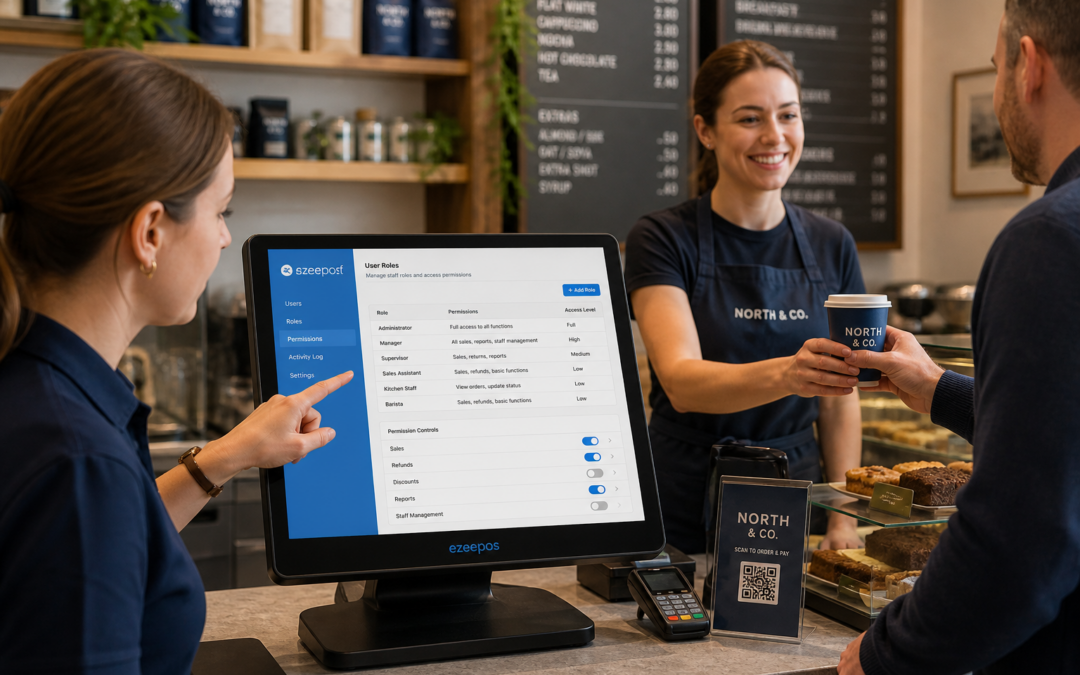
Why staff permissions are worth setting up properly
For many UK retailers and hospitality businesses, the till is one of the busiest points in the business. It is where sales are taken, refunds are processed, discounts are applied and day-to-day decisions often happen in seconds. That is why staff permissions matter. They help you control who can do what on the EPOS system, without slowing the team down.
With the right setup, a manager can keep access to sensitive functions while front-line staff still have everything they need to serve customers quickly. This can reduce errors, protect margins and make training easier for new starters. If you are reviewing your till setup, it is worth looking at practical EPOS software options such as eZeePOS early in the process so permissions are part of the system from the start.
What staff permissions do in a POS system
Staff permissions allow different users to have different levels of access. In a retail shop, that might mean that a sales assistant can process items and apply basic discounts, while only a supervisor can approve refunds or edit prices. In a cafe or restaurant, it may mean waiting staff can place orders, but a manager controls voids, menu changes or end-of-day functions.
This approach is useful because not every team member needs the same access. A clear permission structure helps keep the system tidy and reduces the chance of accidental changes to settings that affect trading.
Common permission levels
- Basic till access for serving customers and taking orders
- Supervisor approval for discounts, refunds and voids
- Manager access for reporting, settings and user control
- Owner access for deeper system changes and oversight
How permissions help in busy shops and hospitality venues
In a busy environment, speed matters, but so does control. Staff permissions help strike that balance. A well-designed EPOS system can keep front-of-house staff moving while still making sure important actions are handled properly. That is particularly useful in independent shops, cafes, bars, takeaways and multi-staff retail counters where several people may use the same till across a shift.
When permissions are set sensibly, staff are less likely to be put off by a complicated interface. They only see the actions they need, which can make training simpler and reduce hesitation at the counter. For managers, this can also provide more confidence that stock-related changes, pricing edits and refunds are being handled correctly.
Examples of where permissions make a difference
- Preventing accidental price changes during a busy lunch rush
- Controlling who can approve refunds after a customer complaint
- Limiting access to staff discounts or manual overrides
- Keeping reporting and settings away from day-to-day till users
Reducing errors without making service feel slow
One of the main benefits of staff permissions is that they help reduce mistakes without adding unnecessary steps. Good EPOS software should not make the till awkward to use. Instead, it should make the right actions easy for the right people and more difficult for those who should not use them.
This can be especially helpful for businesses with part-time staff, seasonal teams or new starters. In those cases, the system can be structured so that people feel confident using the till while managers retain oversight. That means fewer avoidable actions, less admin later and a smoother experience for customers at the counter.
Why permissions matter for refunds, discounts and voids
Refunds, discounts and voids are all normal parts of trading, but they can also create problems if they are too easy to apply. Without proper controls, a business may face inconsistent pricing, unclear records or higher losses than expected. Permissions help by ensuring these actions are only available to the people who need them.
For example, a shop might want most staff to be able to complete standard sales but require a supervisor login before a refund is issued. A restaurant may want front-of-house staff to request a void, but not complete it alone. These small controls can make a meaningful difference over time.
Permissions and staff training go hand in hand
When a new team member starts work, an EPOS system with clear permissions can make training more manageable. Rather than overwhelming them with every available function, you can give them access to the basics first. As they gain confidence, access can be expanded where appropriate.
This staged approach is practical for growing businesses. It supports consistency, keeps the till interface simpler and makes it easier to bring new staff up to speed. In hospitality especially, where service can move quickly, fewer unnecessary options on screen can help staff focus on the customer rather than the software.
Using permissions across multiple roles and sites
Businesses with more than one role, or more than one site, can benefit even more from structured permissions. A manager may need oversight across several tills, while individual staff members only need access to their own location or shift. This can help keep records cleaner and make day-to-day management more straightforward.
If your business is expanding, it is worth thinking beyond the till itself. The best EPOS setup will support the way your team actually works, not just the way you wish it worked. That includes access rights, admin control and who can change critical settings.
Choosing an EPOS setup that gives you proper control
If you are comparing POS systems, staff permissions should be part of the conversation from the outset. Look for software that lets you define access clearly, support different roles and manage permissions without making the system difficult to use. The goal is not to add friction. It is to make the business easier to run.
eZeePOS is designed for UK retail and hospitality businesses that want a practical, easy-to-manage EPOS system. If you are planning a new till setup or reviewing your current one, it is sensible to ask how permissions, user access and everyday control will work before you commit.
For more information, visit www.ezeepos.co.uk. Contact YCR Distribution at sales@ezeepos.co.uk or call 01924 438238.
Whether you run a shop, cafe, restaurant or takeaway, the right permission setup can help your EPOS system stay efficient, controlled and easier for staff to use every day.
Recent Comments