
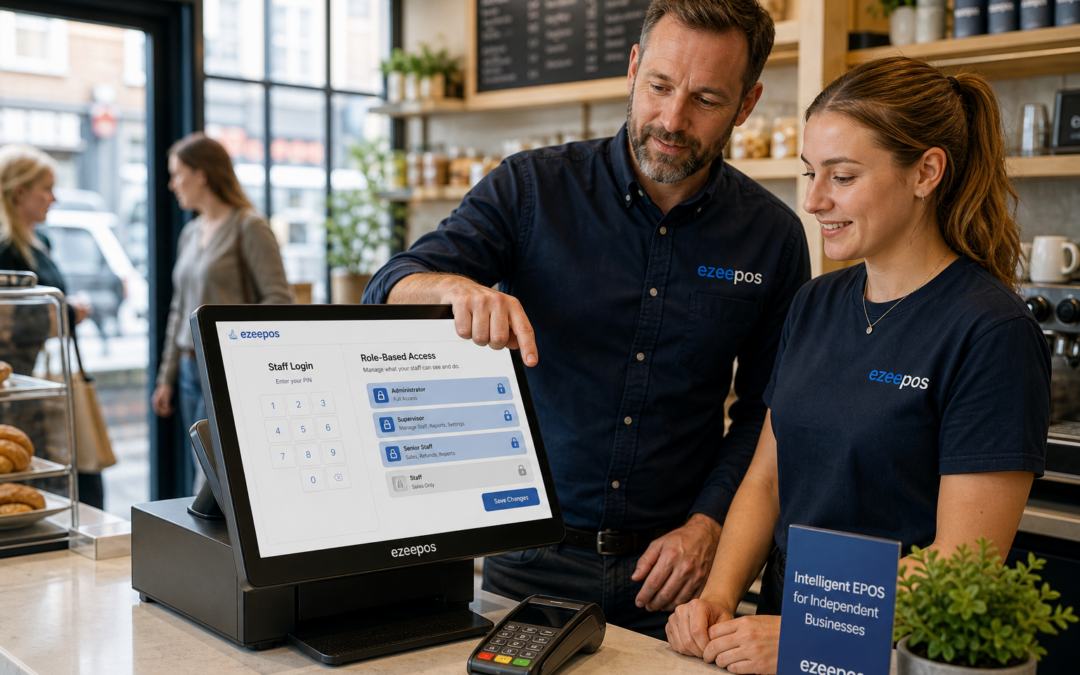
For many independent businesses, the till is more than a checkout point. It is where sales are taken, orders are corrected, discounts are applied and sensitive functions are managed throughout the day. That is why staff permissions remain one of the most practical features in a modern EPOS system.
At eZeePOS, we work with UK retailers, cafés, restaurants, bars and takeaways that want a till system that is simpler to run and easier to manage. Staff permissions help make that possible by giving the right people access to the right functions, without making the system difficult to use.
What staff permissions do in an EPOS system
Staff permissions let business owners decide which users can carry out certain actions on the till. Rather than every team member having the same access, you can set different levels based on role, responsibility or experience.
For example, a new part-time team member may only need to take orders and process sales. A supervisor may need to apply discounts, process refunds or void mistakes. A manager may need access to end-of-day reporting, cash-up tools or settings that should not be changed by everyone.
This is not about making service slower. It is about giving staff what they need to do their job while reducing the risk of avoidable errors.
Why permissions matter for independent retailers
In retail, tills are often busy, and staff may change between shifts or work across different areas of the shop. Clear permissions can help prevent accidental changes to pricing, promotions or sensitive records.
Practical benefits for shops
- Reduce the chance of unauthorised refunds or discounts
- Limit access to reports or till settings
- Help new starters keep to the functions they need
- Make it easier to track who completed a sale or adjustment
For independent shops, this can be especially useful where one or two people manage the business but several staff members use the till each week. A well-set-up EPOS system can give the owner more confidence without adding admin.
Why hospitality businesses benefit too
In cafés, restaurants, bars and takeaways, service can be fast and pressured. Staff permissions help keep that pressure under control by separating everyday functions from manager-only tasks.
For example, a server may need to take orders and split bills, while a supervisor handles voids, discounts or table adjustments. In a busy bar, permissions can help ensure that certain functions are kept for senior staff when things get hectic. In a takeaway, they can help reduce mistakes when multiple team members share the same counter system.
That structure can be particularly useful during peak periods, when speed matters but control matters just as much.
Common permission settings that help day to day
Not every business uses permissions in the same way, but a few settings are commonly useful across retail and hospitality.
Access levels by role
This is one of the simplest ways to manage the till. You can set different access for team members, supervisors and managers so each group sees only what they need.
Discount and refund controls
Discounts and refunds are useful functions, but they can also be a source of mistakes if too many users can apply them freely. Permission settings can help keep these actions under control.
Report and cash-up access
Some businesses prefer only owners or managers to view detailed reports or cash-up information. That can help create a clearer process and reduce confusion at the end of the day.
Void and edit restrictions
Limiting who can void items or amend orders can protect accuracy and make it easier to understand what happened on a shift.
How permissions support staff training
Good staff permissions do not replace training, but they can make training easier. When a new starter logs in and only sees the functions they need, the till feels less intimidating. This can help them learn the system more quickly and build confidence on the job.
For managers, it also means less time spent correcting avoidable mistakes later. Instead of relying on everyone remembering every rule, the EPOS setup can support the process behind the scenes.
That is especially helpful in businesses with seasonal staff, student workers or rotating shift patterns.
Keeping operations secure without creating friction
The best EPOS setup balances control with usability. If permissions are too strict, staff may have to wait for a manager every time something small needs adjusting. If they are too loose, the till can become harder to manage.
A practical setup usually means thinking carefully about the tasks that should be available to everyone and the tasks that should stay restricted. That includes functions such as overrides, discounts, price edits, report access and cash management.
With eZeePOS, the aim is to keep the system practical for everyday use while supporting the controls that matter to independent businesses. If you are comparing EPOS options, permissions are one of the features worth asking about early on.
Choosing a till system with control in mind
When looking at a new EPOS system, it is worth asking how staff access is handled. Can you set different roles? Can you restrict sensitive actions? Can you see who did what, and when?
These may seem like small details at first, but they can make a real difference once the system is in daily use. A strong permission setup helps your team work efficiently while giving you better oversight of the business.
For UK retailers and hospitality businesses, that can mean fewer mistakes, clearer responsibility and a smoother shift handover.
A practical feature for growing businesses
As businesses grow, the till often needs to do more than simply take payments. It becomes part of a wider operating process. Staff permissions help bring structure to that process without making the system complicated.
If your business is expanding, taking on more staff or opening over longer hours, this is one of the EPOS features that can quietly make a big difference.
To find out more about how eZeePOS supports independent UK businesses, visit www.ezeepos.co.uk.
Contact YCR Distribution at sales@ezeepos.co.uk or call 01924 438238.
Recent Comments