
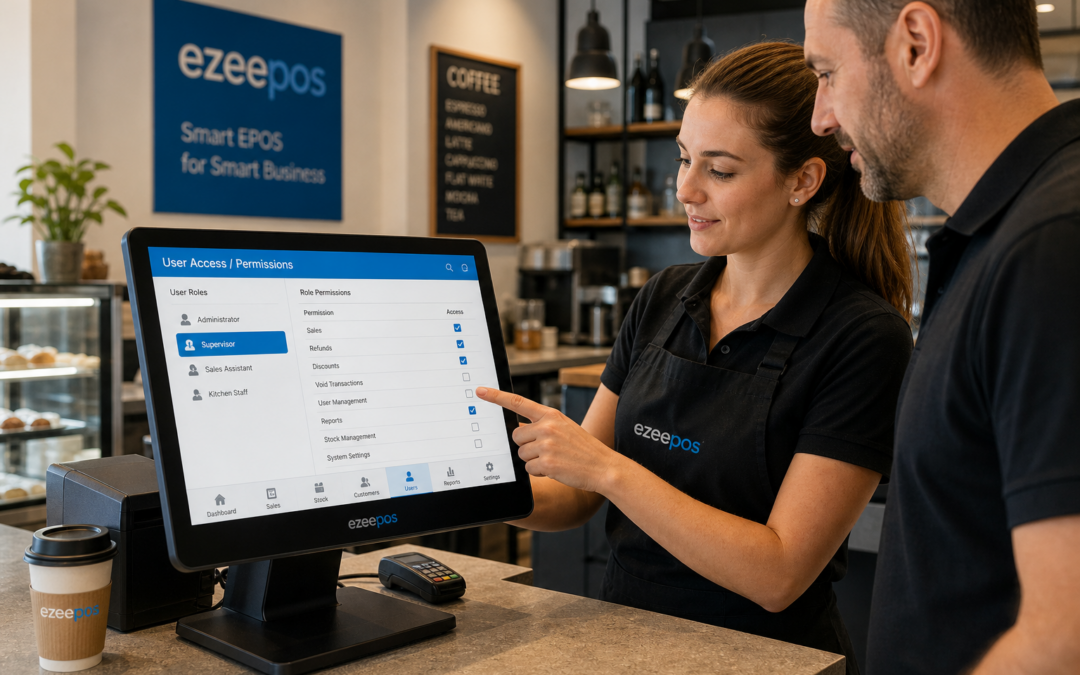
For many independent UK businesses, the EPOS system is used by several people across a single day. A trusted member of staff might serve at the till in the morning, a supervisor may handle refunds at lunchtime, and a manager could close the shop or restaurant in the evening. In that kind of environment, staff permissions are not a minor setting – they are one of the simplest ways to keep service organised.
If you are reviewing your setup, eZeePOS is a practical option to explore. The right permission controls can help your team work confidently without making the system harder to use. For retailers, cafés, restaurants and takeaways, that balance matters.
What staff permissions do in an EPOS system
Staff permissions let you decide which team members can access certain functions on the till. Instead of every user seeing the same menus and admin tools, you can set limits based on role. That might mean a cashier can process sales, but only a supervisor can issue refunds. It might also mean a manager can view reports or edit settings that regular staff cannot.
This is useful because not every employee needs the same level of access. In fact, giving everyone full access can slow things down, create confusion and increase the chance of mistakes. A well-set permission structure keeps the day moving while protecting the parts of the system that should stay under tighter control.
Why permissions matter in busy UK businesses
In a busy retail shop or hospitality venue, the till is often shared. Different staff members may use the same terminal across the day, sometimes with limited training or only a few minutes between customers. Permissions help reduce the risk of unplanned changes, unnecessary voids or accidental deletions.
For example, a new starter may only need access to basic sales functions while they learn the system. A shift leader may need extra permissions to handle exceptions. A manager may need full access to reporting and configuration tools. By separating these roles, you can make the EPOS system more practical for everyone.
Common day-to-day benefits
- Fewer accidental changes to prices, discounts or settings
- Better control over refunds, voids and overrides
- Clearer responsibility across the team
- Less chance of staff using features they do not need
- More consistent procedures during busy service
How permissions can support different business types
Different businesses use permissions in different ways. A clothing shop may want sales assistants to process transactions but restrict access to returns with no receipt. A café may want staff to take orders quickly while keeping discount approvals for supervisors. A takeaway might limit access to delivery adjustments and end-of-day functions to a manager.
This approach is useful because it reflects how real businesses work. The aim is not to make the system restrictive for the sake of it. It is to give each person the access they need and nothing unnecessary.
Retail shops
In retail, permissions can help prevent pricing changes, unauthorised discounts and accidental edits to product information. They can also make it easier to see who completed a transaction if you need to review a sale later.
Cafés, restaurants and takeaways
In hospitality, permissions can help teams stay focused on service. Staff can take orders, print kitchen tickets and process payments without opening functions that should stay with a supervisor or manager. That can be especially helpful during busy lunch or evening periods.
Reducing mistakes without slowing staff down
One of the main reasons businesses hesitate to use permissions is worry about slowing the team down. In practice, a sensible setup should do the opposite. If the permissions match the role, staff can move through normal tasks quickly and only call for help when they need it.
This can be particularly valuable when training new employees. Instead of giving them access to every function straight away, you can start with a simpler set of tools. That makes it easier for them to learn the basics while reducing the risk of errors. As they become more confident, access can be adjusted.
For many businesses, this is a far better approach than relying on memory, verbal instructions or informal habits. A clear EPOS structure makes expectations easier to follow.
Better oversight for owners and managers
Staff permissions also help owners and managers maintain oversight without standing at the till all day. If only the right people can approve important actions, there is less chance of confusion later. It also creates a more consistent audit trail when you need to understand what happened during a shift.
That level of clarity can be helpful for teams working across different locations or for businesses with part-time and seasonal staff. A permission setup gives you more control while still letting the operation run smoothly.
Functions you may want to restrict
- Refunds and voids
- Discount approvals
- Price changes
- Manager overrides
- End-of-day administration
- Reporting access
- System settings
Why this fits well with modern touchscreen tills
On a modern touchscreen till, a clean permission structure can make the interface easier to use. Staff only see what they need, which helps keep the screen uncluttered and the workflow more straightforward. That is useful in fast-paced settings where the till needs to support service rather than get in the way.
If your business is currently using a basic till, a card-terminal-only setup or a manual process, permissions may not have been easy to manage. With a more capable EPOS system, the feature becomes part of everyday control rather than an afterthought.
Choosing a setup that fits your team
When looking at EPOS software, it is worth asking how easy it is to assign and manage staff permissions. A practical system should let you match access to roles without making admin complicated. That is especially important for small businesses where the same person may work across multiple tasks.
eZeePOS supports UK retailers and hospitality businesses that want a straightforward, well-organised till system. If you are reviewing your current setup, think about not only what the system can do, but who should be able to do it. That simple question can improve day-to-day control much more than expected.
For more information, visit www.ezeepos.co.uk and see how a practical EPOS setup can support your business.
Contact YCR Distribution at sales@ezeepos.co.uk or call 01924 438238.
Recent Comments