
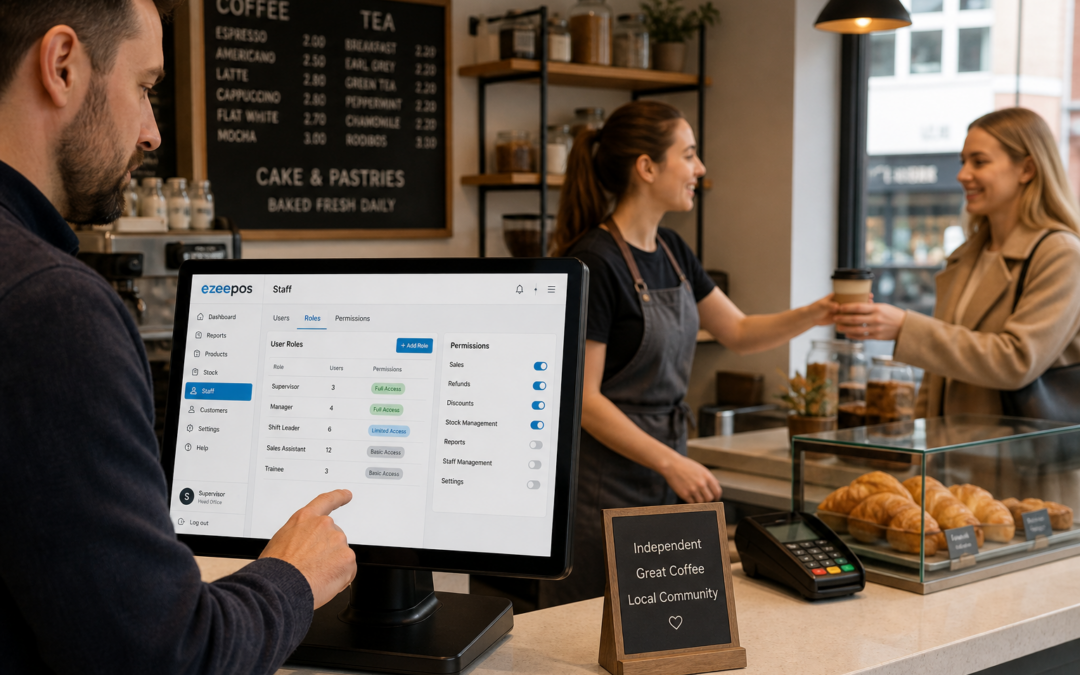
When a till is used by several people across a busy day, not everyone needs the same level of access. That is where staff permissions come in. For independent retailers, cafés, restaurants, bars and takeaways, setting the right permissions can help keep service moving, reduce avoidable errors and make day-to-day operations easier to manage.
At eZeePOS, staff permissions are one of the practical features that can support a more organised EPOS setup. They are not just about control for the sake of it. They are about giving each team member the access they need to do their job well, while limiting the functions that should stay with supervisors or managers.
What staff permissions do in an EPOS system
Staff permissions let you decide who can use which parts of the EPOS software. In simple terms, a junior team member may only need to take orders, process sales and print receipts, while a supervisor may also need to apply discounts, process refunds, edit items or view reports.
This layered access can be especially useful in businesses where several people share one till. It helps avoid confusion, protects important settings and reduces the chance of a well-meaning mistake causing a bigger issue later in the day.
Common functions businesses may restrict
- Price changes and menu edits
- Refunds and voids
- Discounts and promotions
- End-of-day reports
- Cash drawer access
- User setup and system settings
Not every business will need the same access levels, but the idea is the same: keep routine tasks simple for staff, while reserving more sensitive actions for trusted users.
Why permissions matter during busy trading
Busy periods are where clear permissions make the most difference. When the queue is growing and staff are working quickly, it is easy for a minor mistake to become a bigger disruption. If every user can change prices, issue refunds or edit items, the chance of errors naturally increases.
Permissions help create a more stable process. Staff know what they can do, managers know what is being controlled, and the till stays more consistent from one shift to the next. That can be particularly useful in hospitality, where a fast pace and frequent handovers can make things harder to track.
Practical benefits for independent businesses
- Fewer accidental changes to products or prices
- Less risk of unauthorised discounts
- Clearer accountability when reviewing activity
- Simpler training for new starters
- Better control over sensitive functions
How staff permissions support retail teams
In retail, staff permissions can be helpful in shops with mixed ranges or more than one person working the same till. A gift shop, hardware store or convenience store may need to keep checkout work quick, but still want some control over functions like refunds or voids.
If a shop uses promotions or seasonal price changes, permissions can help prevent the wrong item being edited by the wrong person. This is especially useful when part-time staff or temporary workers are helping out during busy periods.
For businesses that use retail EPOS software, permissions can help keep the till easy to use without removing control from the business owner.
How staff permissions support hospitality teams
In cafés, restaurants and takeaways, service teams often need to move quickly between taking orders, taking payments and managing customer requests. Staff permissions can make that process feel smoother by making sure each person sees the tools they actually need.
For example, a server may only need order entry and table functions, while a shift leader may need access to split checks, refunds or end-of-day checks. In a takeaway, permissions might help control discount use or limit item edits when the counter is busy.
This is particularly helpful when new team members are still learning. They can focus on the basics first rather than seeing every function on the system at once.
Permissions can help with accountability
Another advantage of staff permissions is that they support clearer accountability. When different users have different levels of access, it becomes easier to review what happened on a shift and understand who handled what.
That can be useful if a business wants to check discounts, investigate a refund or understand why a transaction was changed. Rather than relying on memory, the EPOS system gives a more reliable record of activity.
For owners and managers, that visibility can make day-to-day oversight less stressful. It also helps reinforce good habits among staff, because the system structure encourages people to follow the right process.
Staff permissions and easier training
Good EPOS training is important, but too many functions on screen can overwhelm new staff. Permissions can make training simpler by limiting access to what a person needs at their stage of learning.
That means a new starter can focus on order entry, checkout flow or table service without being distracted by back-office settings. As they become more experienced, their access can be expanded where appropriate.
This staged approach is often more practical than giving every staff member full access from day one. It helps build confidence and makes it easier for supervisors to keep an eye on progress.
Choosing an EPOS setup with the right access control
When comparing systems, it is worth asking how user roles work in practice. Can you set different permissions for different staff types? Can managers override certain actions? Can you review activity by user? These are useful questions for retail and hospitality businesses that want better control without making service harder.
If you are reviewing a modern touchscreen till or a more advanced EPOS setup, think about who will use it every day. A system should support fast service, but it should also help protect the parts of the business that matter most.
For businesses looking at a practical UK EPOS option, www.ezeepos.co.uk has more information about how eZeePOS can support day-to-day retail and hospitality operations.
Keeping control without slowing staff down
The best staff permission setup is one that feels natural to use. It should not slow down checkout or make the till harder to learn. Instead, it should quietly support better habits in the background, helping the business stay organised during busy service.
With the right structure in place, staff can work confidently, managers can keep control and the business can reduce avoidable mistakes. That is a simple but valuable improvement for any independent operation.
Contact YCR Distribution at sales@ezeepos.co.uk or call 01924 438238.
To learn more about eZeePOS and how it supports UK retail and hospitality businesses, visit www.ezeepos.co.uk.
Recent Comments