
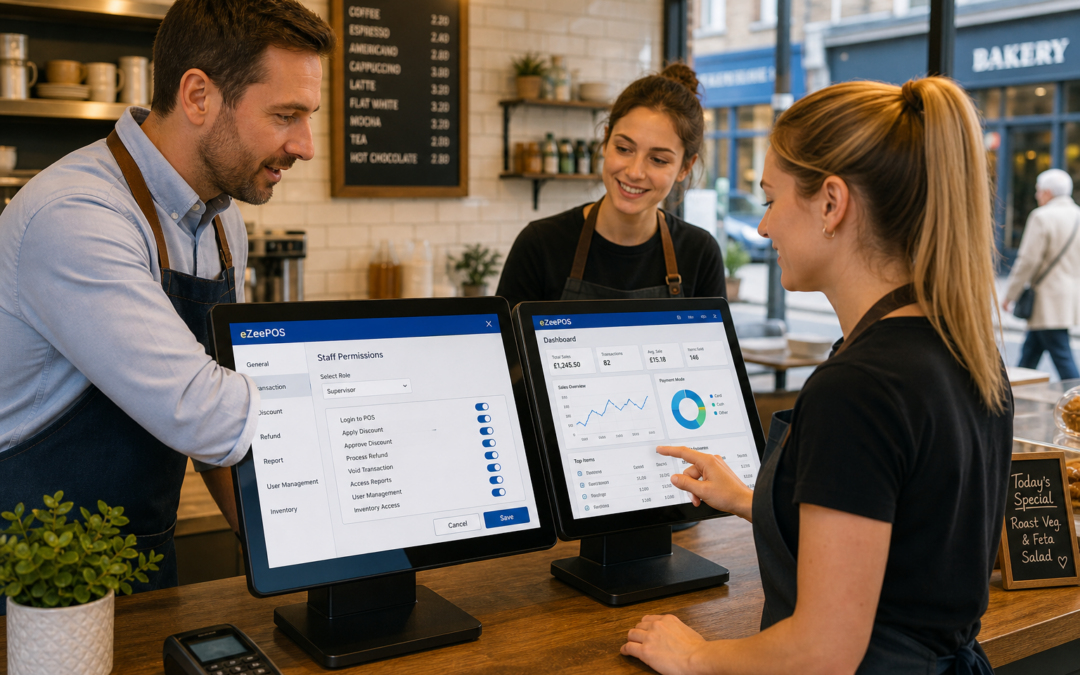
For many UK retailers, cafes, restaurants and takeaways, the till is one of the busiest parts of the business. It is where sales are taken, refunds are handled, discounts are applied and reports are checked. That is why staff permissions are such an important part of a modern EPOS setup.
With the right permissions in place, different team members can have access only to the features they need. That can make daily trading smoother, reduce avoidable mistakes and help managers keep better control of the business. If you are reviewing your setup, eZeePOS is a practical UK EPOS option to explore at www.ezeepos.co.uk.
What are staff permissions in EPOS?
Staff permissions let business owners and managers decide who can do what on the till. In simple terms, they help separate everyday serving tasks from higher-level actions such as voiding transactions, changing prices, issuing refunds or viewing more detailed reports.
This is useful because not every member of staff needs the same level of access. A new starter may only need to take orders and print receipts, while a supervisor may need to manage discounts or close the till at the end of the day. A manager, meanwhile, may need full access to reporting and settings.
Why permissions matter in busy retail and hospitality settings
In a busy shop, cafe or takeaway, small errors can add up quickly. A discount given by mistake, a refund processed without approval or the wrong item being changed at the till can affect both profitability and records. Clear permissions help reduce those risks.
They also make staff training easier. New employees do not need to learn every part of the system on day one. Instead, they can focus on the actions relevant to their role. That can help them feel more confident while you keep greater control over sensitive functions.
Common areas where permissions help
- Applying discounts and promotional prices
- Issuing refunds or voiding items
- Changing completed transactions
- Viewing sales reports and staff performance
- Managing cash-up and end-of-day tasks
How this works in retail environments
For independent shops, staff permissions can be especially useful at the checkout. A busy retail counter often has different types of staff working at different levels of experience. Some may need quick access to scanning and payment functions, while others may also need to handle product changes or customer complaints.
Permissions can help keep retail processes tidy. For example, you might allow basic checkout use for all till staff but limit price overrides or manual discounts to supervisors. That gives the team enough flexibility to serve customers well without opening the door to unnecessary mistakes.
It can also be helpful in businesses such as convenience stores, gift shops, fashion retailers or pet shops where multiple staff members may use the same till during a shift. A structured setup can make it easier to trace who did what and when.
How permissions help in cafes, restaurants and takeaways
In hospitality, speed matters, but so does control. A cafe server may need to take orders and send them through quickly. A team leader may need to split bills, authorise changes or remove items from a table. A manager may need to review the day’s performance.
With well-planned permissions, each role can be tailored to the job. That can reduce disruption during busy service and help avoid situations where too many people can make sensitive changes. It is particularly useful in restaurants, bars, pubs and takeaways where tables, orders and payments all move quickly.
Practical examples
- Limiting refund approval to supervisors
- Restricting discount use to management
- Allowing kitchen order changes only for senior staff
- Controlling who can access sales and staff reports
Better control without slowing the team down
Some business owners worry that permissions will make the system harder to use. In practice, a good EPOS setup should do the opposite. The aim is not to make staff jump through hoops, but to keep the parts of the system they use every day simple while protecting the areas that need oversight.
That balance matters. If permissions are too loose, mistakes and unauthorised actions become more likely. If they are too strict, staff may feel blocked or forced to call a manager for every small task. The best setup is usually one that matches your real workflow.
For many businesses, this means starting with a few clear roles, such as cashier, server, supervisor and manager. From there, you can adjust the permissions to suit the way your business actually runs.
What to consider when setting up permissions
If you are reviewing your EPOS system, it is worth thinking about the following points:
- Which staff members need full control and which do not
- Whether discounts should require approval
- Who can issue refunds or void items
- Who should be able to view reports
- How permissions will work for new starters and part-time staff
It is also sensible to review permissions regularly. As your team changes, you may need to update access levels, especially if staff move into new roles or leave the business.
Permissions, accountability and everyday trading
One of the biggest benefits of staff permissions is accountability. When different actions are linked to individual logins, managers can see how the till is being used across the business. That can help with training, problem-solving and general oversight.
It also supports more consistent trading. Staff are less likely to make unauthorised changes when the system is clear about what they can and cannot do. Over time, that can make the whole operation feel more organised and easier to manage.
A practical feature for growing businesses
Staff permissions are not just for large operations. Independent UK businesses can benefit just as much, especially if they are growing or employing seasonal and part-time staff. A straightforward permission structure can help you keep control without overcomplicating the till.
If you are looking at EPOS software for your retail or hospitality business, it is worth checking that permissions are flexible enough for your team. A system like eZeePOS can help support that kind of practical day-to-day control, whether you run a shop, cafe, restaurant or takeaway.
To learn more, visit www.ezeepos.co.uk.
Contact YCR Distribution at sales@ezeepos.co.uk or call 01924 438238.
Recent Comments