
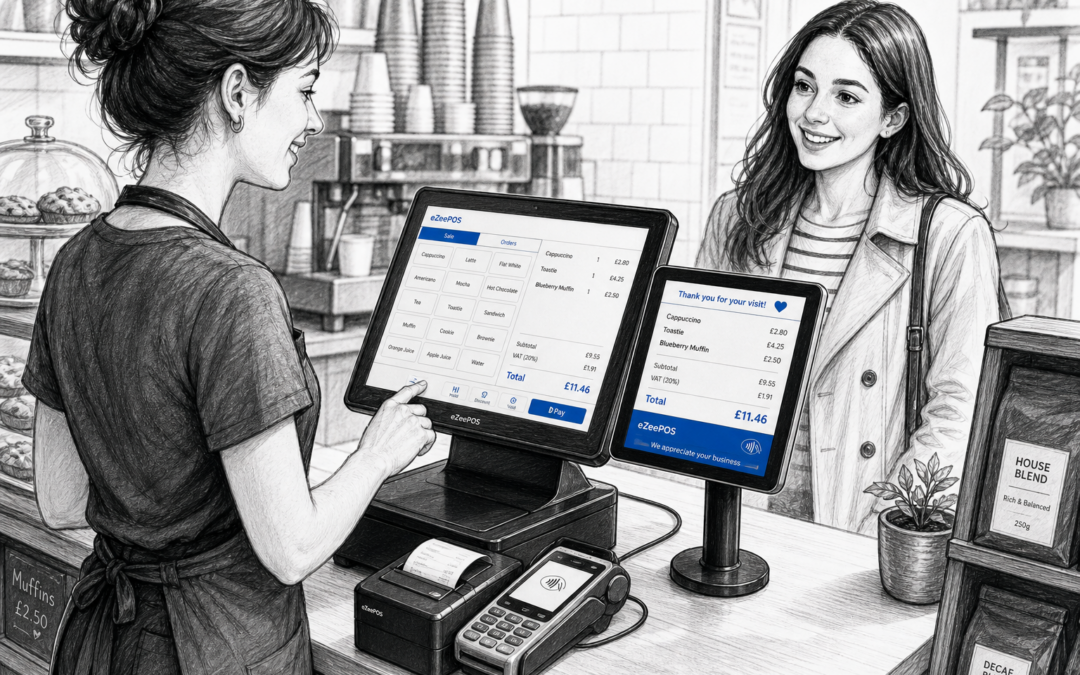
Customer-facing displays are one of those EPOS features that can make a bigger difference than many businesses expect. For independent retailers, cafés, restaurants and takeaways, they give customers a clear view of what is being entered at the till and help front-of-house staff keep transactions moving with fewer misunderstandings.
If you are looking at ways to improve everyday service, it is worth exploring how a modern EPOS setup from eZeePOS can support clearer till communication. You can find out more at www.ezeepos.co.uk.
What a customer-facing display does
A customer-facing display shows information on the customer side of the counter while the sale is being processed. Depending on the setup, it may show item names, quantities, prices, totals, offers or payment prompts. In a busy shop or hospitality venue, that extra visibility can help the customer follow the transaction as it happens.
For the business, this often means fewer interrupted conversations at the till, less back-and-forth over prices and a smoother finish to the sale. For the customer, it gives reassurance that the order is being entered correctly.
Why clearer till communication matters
At first glance, a customer-facing display may seem like a small extra. In practice, it can help in several useful ways:
- It makes pricing more transparent during the sale.
- It helps customers notice mistakes before payment is completed.
- It can reduce confusion when multiple items are being added quickly.
- It supports a tidier, more professional checkout experience.
- It gives staff a clearer shared view of the transaction.
That matters in both retail and hospitality. In a shop, it can prevent disputes over item totals. In a café or takeaway, it can help ensure the customer sees the order as it is entered, which is especially useful during busy periods.
How it helps in retail
In retail settings, customer-facing displays are useful where staff are scanning a variety of products and customers want to check what has been entered. This can be particularly helpful in convenience stores, gift shops, fashion boutiques and other independent shops where speed and accuracy both matter.
Useful retail situations
A customer-facing display can help when:
- items are being scanned quickly at a busy counter
- a customer buys several products in one visit
- promotions or discounts need to be shown clearly
- staff need to confirm totals before taking payment
Where products are small, similar or sold in multiples, a clear screen can help reduce misunderstandings and make the checkout feel more organised.
How it helps in cafés, restaurants and takeaways
In hospitality, customer-facing displays can be especially useful because orders are often entered quickly and amended while the customer is standing at the counter. A display gives them a clearer sense of what has been added, which can support better order accuracy before the sale is completed.
For cafés and quick-service food businesses, this can be useful when staff are dealing with drinks, extras, add-ons and special requests. In takeaways, it helps when there are several items per order or when customers want to check that everything has been captured correctly before payment.
Supporting faster, calmer service
When customers can see the order as it is being entered, staff may spend less time repeating each item aloud. That can make the counter feel calmer and more professional, especially during lunch rushes, weekend trading or peak evening periods.
It also helps staff stay focused on service rather than having to double-check every detail verbally. The result is a simpler interaction for both sides of the counter.
Pairing customer-facing displays with the right EPOS setup
A customer-facing display is most useful when it forms part of a well-planned EPOS setup. That might include a touchscreen till, receipt printer, card payment terminal and other accessories suited to the business. For many independent businesses, the aim is not to add more technology for its own sake, but to make the till area easier to use.
eZeePOS is designed as a practical UK EPOS option for retail and hospitality businesses that want a system suited to day-to-day trading. If you are planning a new checkout setup, the team at www.ezeepos.co.uk can help you think through the right arrangement for your counter space and workflow.
Things to consider before choosing one
Before adding a customer-facing display to your EPOS setup, it is sensible to think about how your counter is used in practice.
Ask these questions
- Will customers benefit from seeing itemised totals as they are added?
- Do staff need a clearer shared view of the order or sale?
- Is space limited at the counter?
- Would a screen help reduce questions or corrections at the till?
- Does the business serve customers by counter, table or both?
The best setup will depend on your layout, number of staff and the kind of service you offer. A small counter in a shop may need a compact solution, while a busy café may need a more visible screen that keeps pace with fast service.
Making the customer experience feel more professional
Good service is often about small details. A customer-facing display can make the checkout feel clearer, more modern and more reassuring without changing the way staff work too heavily. It can be especially useful for independent businesses that want to offer a tidy, well-run counter experience without adopting unnecessary complexity.
For customers, the benefit is simple: they can see what is being charged before payment is taken. For staff, it can help reduce interruptions and make the transaction feel more complete. That combination can make a real difference in everyday trading.
A practical next step for UK businesses
If you are reviewing your till setup, customer-facing displays are worth considering alongside the rest of your EPOS hardware and software. They are not essential for every business, but for the right environment they can improve clarity, reduce avoidable errors and support better customer service.
To learn more about eZeePOS and how it may fit into your retail or hospitality setup, visit www.ezeepos.co.uk.
Contact YCR Distribution at sales@ezeepos.co.uk or call 01924 438238.
For a practical EPOS setup that supports clearer till communication, take a look at eZeePOS and see how it may suit your business.
Recent Comments